
Ready-made integrations
The apps built by Memberfy in Settings › Integrations and APIs › Integrations (Discord, Slack, Telegram, RD Station, HubSpot and shortcuts to Zapier, Make and n8n). Turning one on with the consent, Send test, Disable, Remove integration, the delivery history with resend and the e-mail when an app is turned off after failures.
A ready-made integration takes the community's events to an app without you building anything on the other side: "Ready-made integrations built by Memberfy: pick the app, fill in its details and choose the events." Whoever joined, bought, subscribed or completed a course becomes a message in the team's channel, a lead in RD Station or a contact with a won deal in HubSpot.
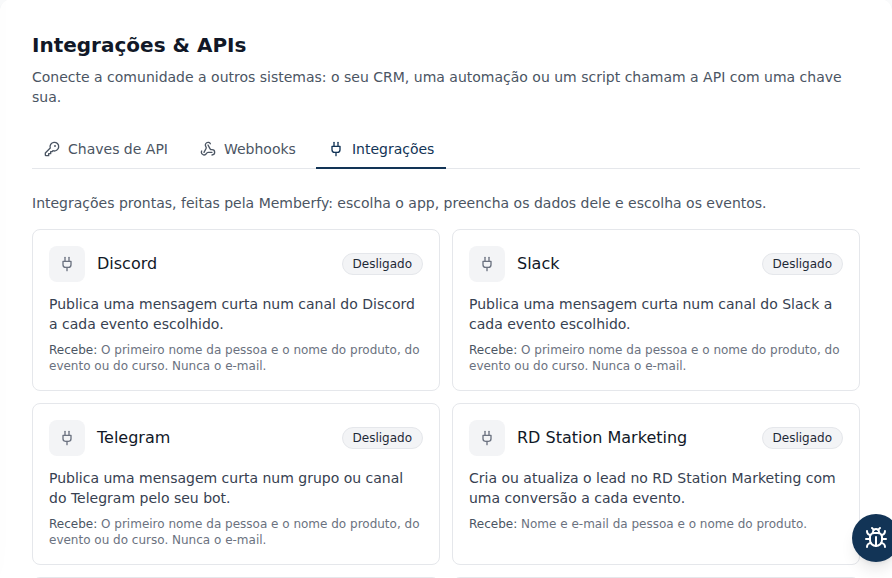
Where it is
Role: owner and admin.
Settings › Integrations and APIs, Integrations tab. The direct link is /settings/integrations?sub=apps; the button in the warning e-mail takes you there.
The apps
| App | What it does | What it receives |
|---|---|---|
| Discord | A short message in a channel | The person's first name and the name of the product, event or course. Never the e-mail |
| Slack | A short message in a channel | Same as Discord |
| Telegram | A short message in a group or channel, through your bot | Same as Discord |
| RD Station Marketing | Creates or updates the lead, with a conversion for each event | The person's name, e-mail and phone and the product name |
| HubSpot | Creates or updates the contact and records purchases and renewals as won deals | Name, e-mail and phone, the product and the amount paid; on cancellation, the subscription status |
| Zapier, Make and n8n | Shortcut (Via webhook): opens the webhook form pre-filled, with the guide | The full event, signed, like any webhook |
Channel messages (Discord, Slack, Telegram) go out in the community's language and carry only the first name. A name or title that looks like a link is never posted: "Someone" or "(untitled)" goes instead.
Step by step: turn an app on
- In Integrations, click the app's card.
- Read How to connect …: it says where to create the credential at the provider. Each app's article has the full path.
- Paste the credential (the webhook URL, the token or the key).
- Under Events, keep checked the ones you want. All come checked; at least one is required.
- Check This app will receive: …. The first time, the app does not turn on without this consent.
- Click Turn on. The screen confirms: "{app} is on. Use Send test to check it."
- Click Send test.
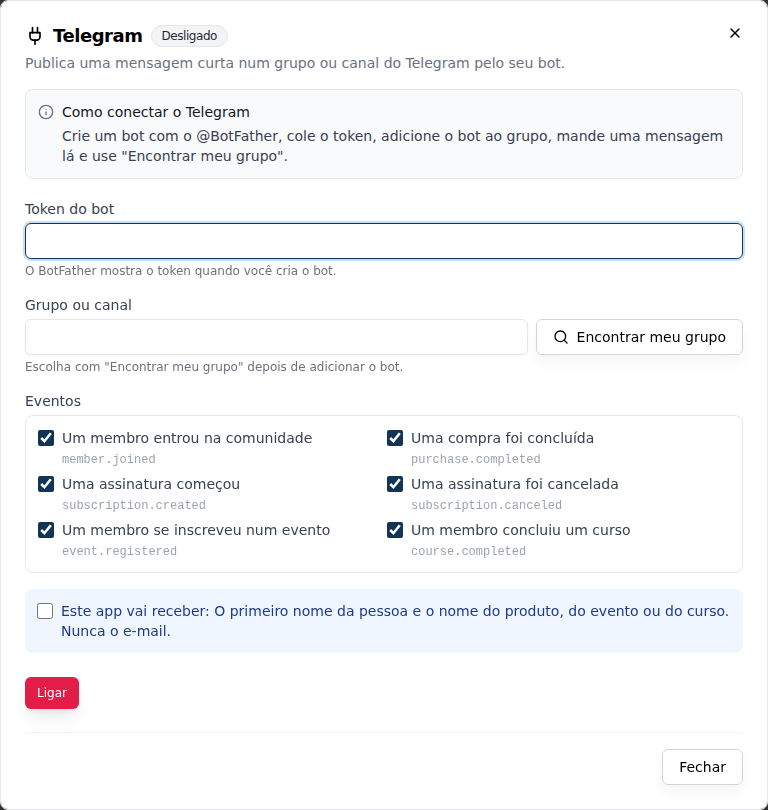
In the Slack, Discord and Telegram apps, the check-in events (checked in and check-in undone) are off by default; tick them on the integration screen to receive them.
Manage an app
| State | What it means |
|---|---|
| On | The checked events are reaching the app |
| Off | Never turned on, or someone turned it off; nothing is sent |
| Failing | The provider failed for too long and Memberfy turned the app off (see below) |
- Save: change the credential or the events and save. A credential left blank stays as it is ("Leave blank to keep the saved value."); the saved one shows masked (
••••abcd). "Changes apply to the next events; whatever was already on its way keeps the previous settings." Changing the credential resets the failures. - Send test: sends a test message now ("Memberfy test: the integration is working.") or, for the CRMs, checks the credential without creating a lead or contact. It shows "Test delivered." or the reason, such as "The provider refused the credentials. Check the token or key and save again.". It is not retried and only works with the app on.
- Disable: deliveries stop at once and pending attempts are canceled. "The settings are kept so you can turn it back on later": just click Turn on, without pasting anything again.
- Remove integration: deletes the app's credential and delivery history, for good. "To use it again, you will have to fill in the details again."
Disabling and removing ask for confirmation. What happens while the app is off is not sent later.
Deliveries
An app's detail has the Deliveries section, the same as for webhooks: each send with the event, the state (Pending, Delivered, Failed, Canceled), the attempts and the provider's answer. Open a delivery to see the attempts and click Resend to send it again. Deliveries are kept for 30 days.
When the provider fails, Memberfy tries again after 1 min, 5 min, 30 min, 2 h, 6 h, 12 h and 24 h. When the provider asks to wait, the wait does not count as a failure.
Turned off after failures
If the provider goes 72 hours without a successful delivery, the app becomes Failing: "Turned off after repeated failures. Check the details and use Turn on to restart it." The owner and the admins get an e-mail with an Open Integrations button. Check the credential (a revoked token, a deleted channel), save and click Turn on.
The Change history in the Webhooks tab also shows who turned on, saved, tested, disabled or removed each integration, and when, including System when it was turned off after failures.
Frequently asked questions
Why don't I see the Integrations tab? It is for the owner and admins only.
Can I turn the same app on twice, for two channels? No: each app turns on once per community. For a second destination, use a webhook with Zapier, Make or n8n.
Disable or remove? Disabling is a pause: the credential is kept. Removing deletes the credential and the delivery history, and cannot be undone.
Can the AI assistant turn an app on? No. It only reads the apps' state (see below); turning on, testing, disabling and removing happen on the screen.
Through the assistant and the API
- Through the AI assistant:
list_integrationswithtype: appsshows owner and admin the state, events and failures of each app, never the credential. Ask "Is any app or webhook failing?" (recipe 76). - Through the API: the
/api/appsroutes athttps://developers.memberfy.net(catalog, turn on and save, test, disable or remove, deliveries and resend), only with the login token of an owner or admin, never with an API key. The specification is at developers.memberfy.net/docs.json.