
Sales
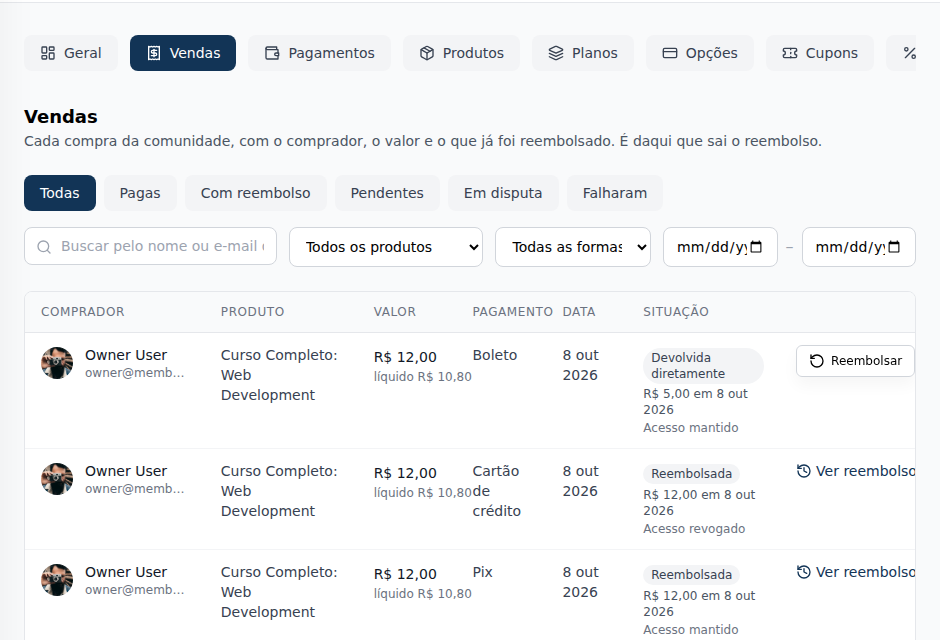
The Sales tab in Monetization lists every purchase in the community (one-time product, plan and add-on), one line per sale, with the buyer, the status, the amount and the net, the payment and the date, with filters and search. Each sale opens in a detail with the summary, the Refund button and the timeline.
The Sales tab shows every purchase in the community: one-time products, plans and add-ons, with who bought, how much they paid, how much stayed with the community and what status the sale is in. Each sale opens in a detail, with the timeline of everything that happened to it. The refund starts here.
What it's for
- Finding someone's purchase by name or email.
- Seeing how much each sale left for the community (the net, already without the platform fee).
- Knowing the status of each sale: paid, refunded (in full or in part), disputed, awaiting payment.
- Opening a sale and seeing, in order, the payment, the balance release, the reserve, each step of a refund and the emails the buyer received.
- Refunding a buyer.
Where it lives
Administration › Monetization › Sales, the second tab, right after Dashboard.
Who can open it: owner, admin and finance. All three can refund. Moderators and members don't see Monetization.
How it works
The list
One line per sale, newest first, without photos:
| Column | What it shows |
|---|---|
| Buyer | Name and, below it, the email |
| Product | The product, the plan's billing option or the add-on (Add-on of a plan) |
| Status | Where the sale stands (see The status). Hover to see a refund's amount, date and access |
| Amount | What the buyer paid and, below it, the net (what stayed with the community) |
| Payment | Credit, Debit, PIX or Boleto; for a card in installments, the number of installments (Credit in 3 installments) |
| Purchased on | The date and time of the purchase (Oct 8, 2026, 2:32 PM) |
| ⋮ | View details always; Refund while there is something to refund |
Clicking anywhere on the row also opens the detail. On a phone, each sale becomes a card, in the same order. The list shows 20 sales per page.
Filters and search
- Search by buyer name or email.
- Product: one product, one billing option or one add-on.
- Status: one of the column's statuses, with the same names.
- Payment method: credit card, PIX or boleto.
- From and To: the purchase date range.
The total and the pages count only what matches the filters. Clear filters goes back to the whole list.
The status
The Status column and filter use the same names. When the sale had a refund, the last refund decides; otherwise, the payment does.
| Status | Meaning |
|---|---|
| Paid | The payment was confirmed and there was no refund |
| Processing | A refund was requested and is being confirmed; it usually takes a few minutes. The status updates on its own |
| Waiting for balance | The community's receiving account doesn't have the balance for its part yet. The refund goes out on its own once balance comes in. See No balance |
| Refunded | The full amount went back to the buyer. Shows the amount, the date and whether access was kept or revoked |
| Partially refunded | Part of the amount went back to the buyer; the rest can still be refunded |
| Returned directly | Purchase paid by boleto: the community returned the money directly to the buyer and recorded it |
| Under review | Memberfy is checking the refund, and completes or declines it |
| Refund declined | The payment provider declined it, with the reason. Nothing changed in the balance or the access, and you can try again |
| Disputed | The cardholder opened a dispute (chargeback). See Dispute |
| Awaiting payment | A PIX or boleto that hasn't been paid yet |
| Failed | The payment was declined or didn't go through |
A sale refunded with access kept shows as Refunded, with the amount, the date and Access kept, even though the buyer keeps what they bought.
The sale detail
Click the sale (or ⋮ › View details). The detail opens in place of the list, with Back to sales; the page address keeps the sale, so you can send the link to someone on the team.
The Summary, on the side:
| Field | What it shows |
|---|---|
| Amount | What the buyer paid |
| Platform fee | The sale's 6.99% + US$ 1.00 (6.99% + R$ 2.49 in reais) |
| Net | What stayed with the community |
| Payment | The payment method and, for installments, the installments |
| Coupon | The coupon used, if any |
| Purchased on | The date and time |
| Already refunded and Can be refunded | What already went back to the buyer and what can still go back |
Below it, the Refund button, when there is something to refund. On a plan sale, View subscription opens the subscription in Members › Subscriptions.
The Timeline, oldest first. Each event has the date, the time and who did it: the buyer, someone on the team (with their name and role, such as Ana Souza · Finance), Memberfy, the payment provider or the system. The date and time sit next to each event, in the community's time zone (that of the business information's country), as the note under the title says: "Times in the community's time zone: Brasilia Standard Time". The event's text doesn't repeat the date. It shows:
- the purchase and the payment (confirmed, declined, canceled or expired), with the payment method and the installments;
- the balance release, per installment when paid in installments: what is still ahead carries the scheduled label and shows only what is left after that sale's refunds and chargebacks; when nothing is left, the scheduled release goes away;
- the chargeback reserve: when it was held, when it comes back and when it came back (including because of a refund); the scheduled return also takes out what was refunded and goes away when nothing is left;
- each step of a refund: requested (with the reason, if any), processing, waiting for balance (with the attempts and the Last attempt), under review by Memberfy and its decision, completed (how much left the community's balance and how much platform fee came back), declined (with the reason) or recorded as returned directly to the buyer;
- access kept or revoked, and the subscription canceled;
- the chargeback opened, with its reason, and its outcome;
- the emails to the buyer: sent, delivered or not delivered.
A sale's refund history lives here, in the timeline. The timeline never shows the payment provider's cost.
When Refund doesn't show
Refund disappears from the menu and the detail when there's nothing left to refund. A Partially refunded sale keeps it, for what is left. And a purchase with no charge at the payment provider has no button: the menu explains why. See Purchase with no charge at the provider.
Step by step: find a sale and refund it
Role: owner, admin or finance.
- Open Monetization › Sales.
- In Search by buyer name or email, type who bought (for example, [email protected]).
- Click the sale to open the detail and check the timeline.
- Click Refund (in the detail or in ⋮ on the list).
- Follow the dialog: see How to refund.
Examples
Which sales were partially refunded this month? In Status, choose Partially refunded and set the month in From and To.
A purchase with an agreed discount. Maria bought the US$ 297.00 course by PIX and was refunded keeping her access. Her row shows Refunded; on hover, US$ 297.00 on Oct 8, 2026 and Access kept: she stays in the course.
A sale's timeline. Maria's same sale, opened, with the fee paid by the organization (US$ 20.76 + US$ 1.00 = US$ 21.76; net US$ 275.24):
| When | Who | What |
|---|---|---|
| Oct 8, 2:02 PM | Buyer | Purchase created: US$ 297.00 |
| Oct 8, 2:03 PM | Payment provider | Payment confirmed: US$ 297.00 by PIX |
| Oct 8, 2:03 PM | System | Email to the buyer (payment confirmation): sent |
| Oct 8, 2:03 PM | System | Chargeback reserve held: US$ 11.88 |
| Oct 15, 10:20 AM | Ana Souza · Finance | Refund requested: US$ 297.00, access kept. Reason: Agreed discount |
| Oct 15, 10:21 AM | Payment provider | Refund completed: US$ 297.00 returned to the buyer; US$ 275.24 left the community's balance and US$ 21.76 of platform fee came back |
| Oct 15, 10:21 AM | System | Chargeback reserve returned because of the refund: US$ 11.88 |
| Oct 15, 10:21 AM | Ana Souza · Finance | Access kept |
A boleto returned in part. A US$ 12.00 boleto with US$ 5.00 returned directly shows as Returned directly, and the menu keeps Refund, because US$ 7.00 can still be returned.
Common errors and how to fix them
| What happens | Why | What to do |
|---|---|---|
| We couldn't load the sales. | The list didn't respond | Reload the page |
| We couldn't load the sale. | The detail didn't respond | Click Try again |
| No sales match these filters | The filters don't match any purchase | Click Clear filters |
| The menu has no Refund and shows an explanation | The purchase has no charge at the payment provider | See Purchase with no charge at the provider |
| A timeline event says scheduled | The date hasn't come yet (a release, the reserve coming back) | Nothing: it happens on its own on that date |
| I don't see the Sales tab | Your role is moderator or member | Ask an owner or admin |
Frequently asked questions
Can finance refund? Yes. Owner, admin and finance can refund.
Do the list or the timeline show the payment provider's cost? No. The net is the amount minus the platform fee, which is what the community pays Memberfy.
Does a refunded purchase disappear from the list? No. It stays, with the refund status. Filter by Status to see only those.
Where do I see a sale's earlier refunds? In the sale detail, in the timeline: each refund, with who asked, how much, the reason and the result.
In the API
GET /api/manage/purchases lists the sales (filters situation, with one or more statuses separated by commas, status, productId, paymentMethod, refunded, from, to and search), and each sale carries the situation field. GET /api/manage/purchases/{purchaseId} returns one sale with all its refunds and the timeline, oldest first. See Responses and errors.
Through the assistant
list_purchases finds the sale and filters by status ("Which sales were partially refunded this month?"); get_purchase shows the refunds and the timeline ("Show me the timeline of Maria's sale"). See Tools · Finance.