
Invite your first members
Who to bring in first, with which role, and what each invitee receives. The playbook for your first 10 members.
Your first members set the tone of the community. Bring in people who will really take part, with the right role, and make sure each one knows how to get in.
Role: owner or admin.
Who to bring in first
| Who | Role | Why |
|---|---|---|
| Whoever will help you look after the community | Moderator | Answers questions, pins announcements, moderates comments |
| A partner or right hand | Admin | Manages members, spaces and settings with you |
| Your accountant or finance person | Finance | Sees the balance, sales and payouts, without changing anything |
| 5 to 10 members who already take part | Member | Get the first conversations going |
What each role can do is in Roles and permissions.
Invite
- Administration › Members › Invite Members.
- In Member Emails, type the email addresses, separated by commas, spaces or Enter.
- Choose the Role.
- Send Invites.
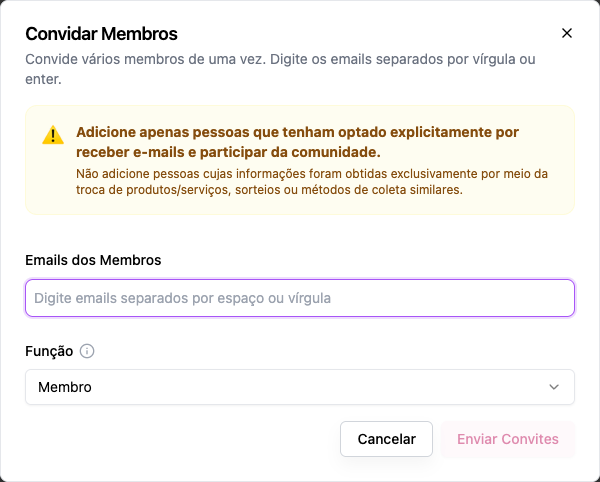
The invite puts the person in the community right away: there is no pending acceptance. Anyone without an account gets one and receives an email with Set my password, a link that is valid for 7 days and works only once. Anyone who already had an account receives a notice that they were added and signs in with the login they already use. This applies both to a single invite and to several emails at once.
A playbook for the first 10
- Day 1: invite 2 moderators. Ask them to introduce themselves in the Feed.
- Day 2: invite 8 members, with a personal message from you on the side ("I just invited you, go take a look and tell me what you think").
- Day 2: pin a welcome post in the Feed asking everyone to introduce themselves.
- Day 3: reply to every introduction. A new community lives on quick replies.
- Week 1: schedule the first event (a 30-minute live session is enough).
What the person receives and sees
- The invite email: with the link to set a password (for people without an account) or with the Sign In button (for people who already had one).
- On first login, the initial section's space.
- The menu with the spaces their role and the visibility settings let them see.
What if people sign up on their own?
With Allow New Sign-ups turned on in Settings, anyone who has the address creates an account and joins as a Member. See Sign-up and entry.
Frequently asked questions
I invited someone with the wrong role. Change it in Members by editing the person. See Manage members.
The person says they didn't get the email. Ask them to check their spam folder. If the link's 7 days have passed, point them to Forgot password? on the sign-in screen.
Can I invite someone as owner? Not through the invite. Invite them as admin and, as owner, promote them afterwards.
Everything about invites is in Invite members.