
Plans
A plan is a subscription tier. It groups billing options (Monthly, Annual), says what the member gets, unlocks spaces, takes add-ons, and has its own address to share.
A plan is a subscription tier: Starter, Growth, Business; Silver, Gold, Platinum; Student, Student + Mentoring. It groups the billing options (the ways to pay, such as Monthly and Annual), says what the member gets, and is what unlocks the spaces for paying members.
What it's for
| Community | Plans | What each one unlocks |
|---|---|---|
| Online school | Student (R$ 49/month) and Student + Mentoring (R$ 149/month) | Student: courses. Mentoring: courses and the mentoring room |
| Coworking space | Flex (R$ 290/month) and Resident (R$ 890/month, 12-month contract) | Flex: calendar and announcements. Resident: everything, plus the residents' board |
| SaaS platform (Memberfy's own catalog) | Starter, Growth, Business, Scale, each Monthly and Annual | The size of the community |
The plan is not the price: the price lives in the billing options. That lets you sell the same plan in several ways (monthly with no contract, monthly with a contract, annual in 12 installments) without duplicating what it delivers.
You can set up the plans, options, add-ons and downsell before the Business Information is approved: the options start as Draft. The plan only shows up on the pricing page once it has an Active option, and setting an option to Active requires approval.
How it works
What a plan has
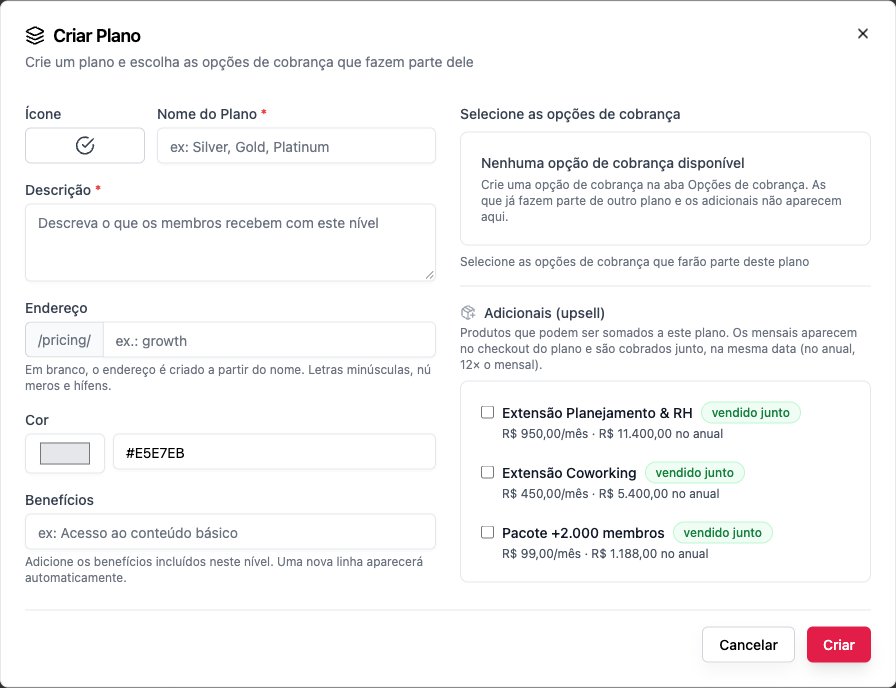
| Field | What it's for |
|---|---|
| Icon | An emoji shown on the plan's card |
| Plan Name * | E.g. Growth |
| Description * | What the member gets at this tier. Shown on the pricing page |
| Address | The plan's direct link: /pricing/<address>. Left blank, it's created from the name. Lowercase letters, numbers and hyphens |
| Color | The card's color |
| Benefits | A list, one per line. A new line appears on its own |
| Currency | All the plan's options use the same currency. It can't change once the plan has options |
| Billing options | The ways to pay that are part of the plan |
| Add-ons (upsell) | Products that can be added to the plan. See Add-ons |
Rules
- A billing option belongs to only one plan. Options that are already part of another plan, and add-ons, don't show up in the list to tick.
- The billing option comes first. The plan only lists what already exists; with no options, you see "No billing options available".
- A plan only truly goes away with no subscribers. A plan with options attached or active subscriptions can't be deleted: "Remove all billing options and wait for active subscriptions to end before deleting this plan."
- The name is unique within the community ("A subscription group with this name already exists"), and so is the address ("A plan with this address already exists in this community").
Who can
Create, edit and delete plans: owner and admin. Finance sees the plans and the subscribers.
Step by step: create a plan
Role: owner or admin.
- First create the plan's billing options (e.g. Growth · Monthly at R$ 129 and Growth · Annual at R$ 1,188). See Billing options.
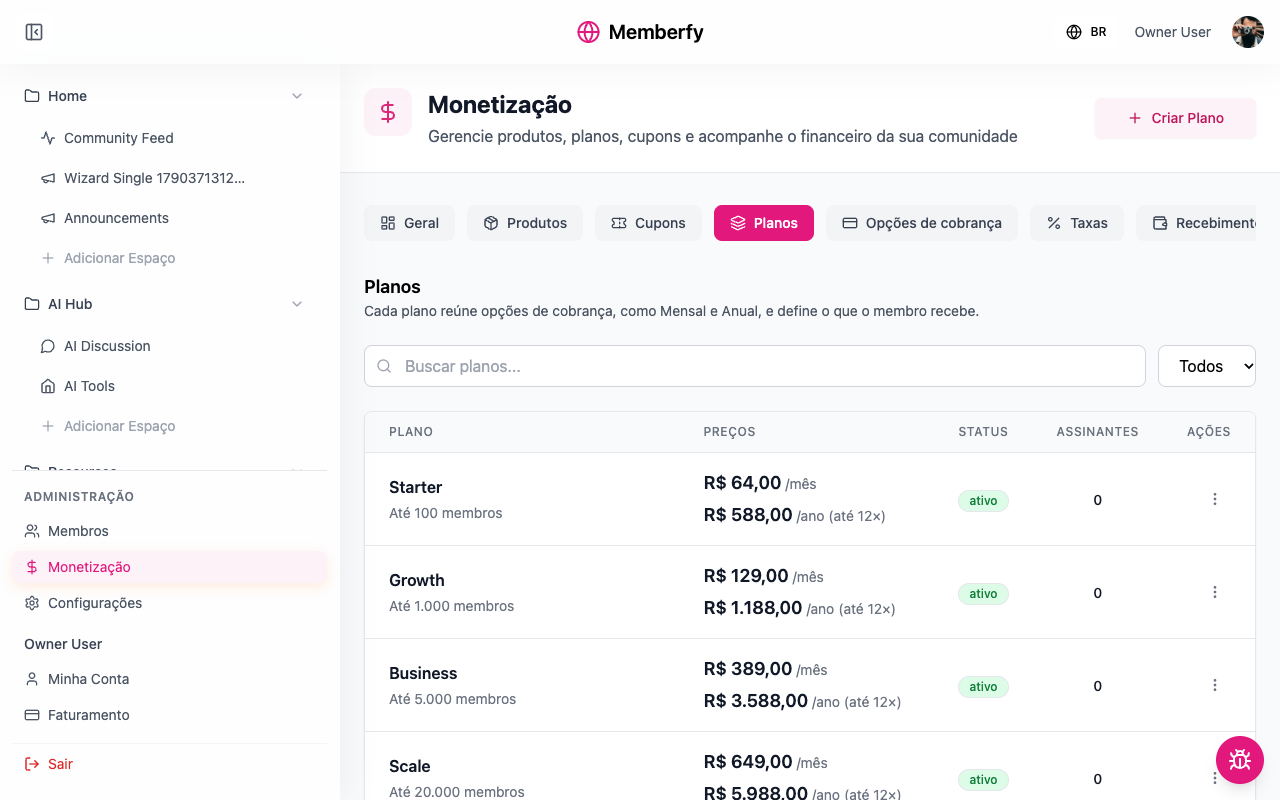
- Open Monetization › Plans and click Create Plan.
- Choose the Icon and write the Plan Name and the Description.
- If you want, set the Address (e.g.
growth). The direct link becomesyour-address/pricing/growth. - Choose the Color and write the Benefits, one per line.
- Under Select billing options, tick the ones that are part of the plan.
- Under Add-ons (upsell), tick the products that can be added to the plan, if any.
- Click Create.
The Plans table shows each plan with its options' prices, its status, and how many subscribers it has.
Step by step: unlock spaces for the plan
Role: owner or admin.
You have two ways:
| Space visibility | Who gets in |
|---|---|
| Subscribers | Anyone subscribed to any plan |
| Private, with the plan under Who gets in › Plans | Only those subscribed to that plan |
- In the menu, open Space options › Edit space.
- Choose Private and, under Who gets in, Add a plan.
- Save.
To unlock a whole section, do the same on the section. See Visibility and access.
What the subscriber sees
- They open the pricing page,
/pricing, and see one card per plan: name, description and "From" the lowest monthly price. - They choose the plan. Choose a billing option appears, with the Monthly | Annual toggle when there are both. On annual, the screen works out the savings on its own (e.g. Save 23%, when the R$ 1,188 annual equals R$ 99 a month against R$ 129 for monthly).
- If the plan has add-ons, Add-ons for this plan appears, to tick.
- Under Payment Details, they choose PIX, card or boleto and pay. See Checkout.
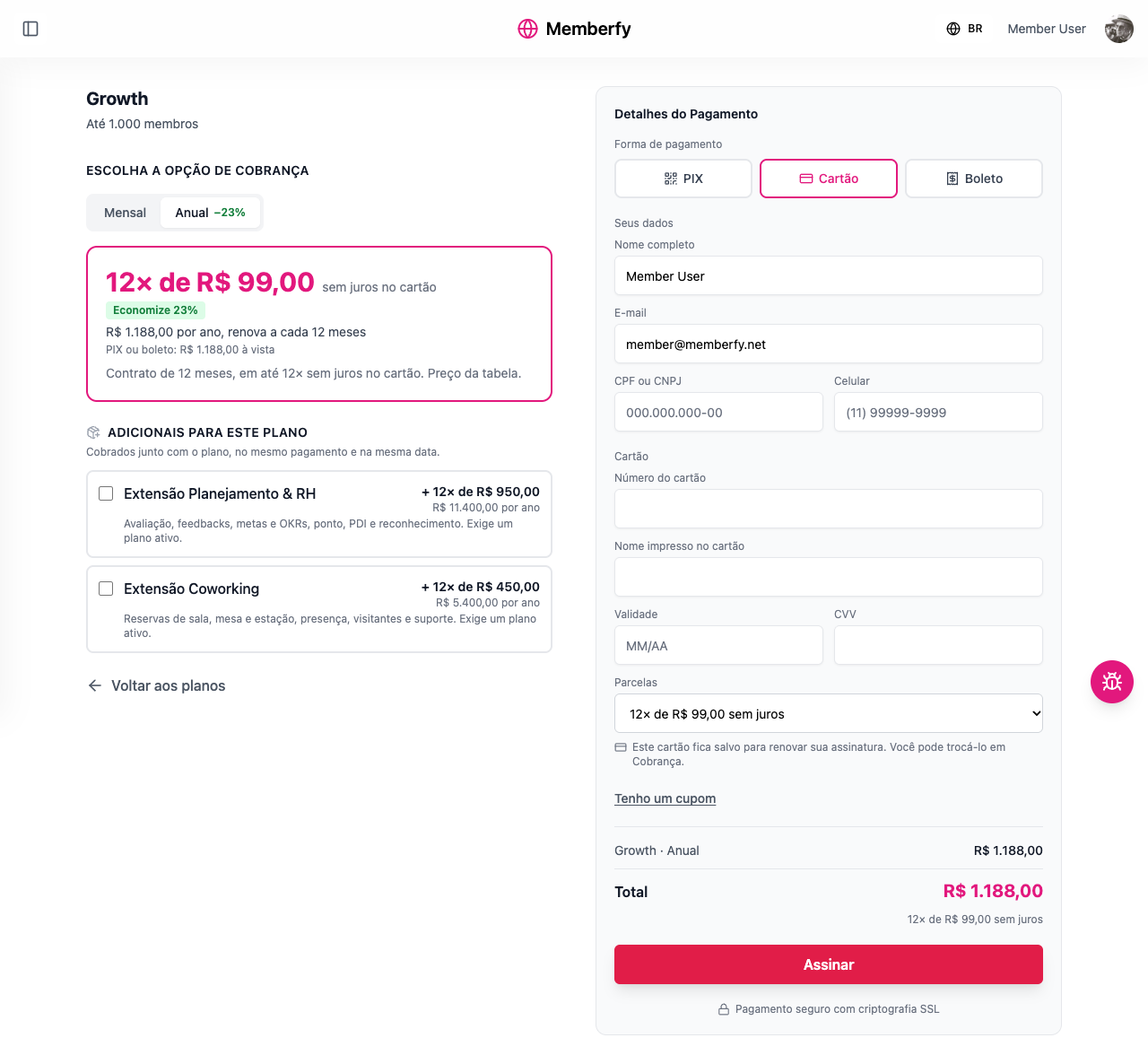
Anyone arriving through the direct link (/pricing/growth) lands on the chosen plan.
Examples with numbers
The platform fee is 6.99% + R$ 2.49 per charge. See Platform fee.
Growth Monthly, R$ 129. Each month: a fee of R$ 9.02 + R$ 2.49 = R$ 11.51. The community keeps R$ 117.49 a month.
Growth Annual, R$ 1,188 in up to 12 card installments. One charge a year: a fee of R$ 83.04 + R$ 2.49 = R$ 85.53. The community keeps R$ 1,102.47 for the year, the equivalent of R$ 91.87 a month. Compared with 12 monthly payments (12 × R$ 117.49 = R$ 1,409.88), the community receives less on annual, but it gets the whole year at once and loses no one mid-year.
100 Growth Monthly subscribers. R$ 12,900 a month in sales; R$ 1,151 in fees; R$ 11,749 net.
How to build a ladder of plans
A good ladder has few rungs, and each one answers "what do I get on top?".
- Start with two or three plans. More than that makes the choice confusing.
- Differentiate by what people get, not just by price. The higher plan unlocks one more space, a mentoring session, an exclusive event.
- Use the same ways to pay on all of them. If one plan has Monthly and Annual, the others should too, so the pricing page's Monthly | Annual toggle works the same way for all of them.
- Make annual worth it. The page works out the savings on its own; 15% to 25% is typical.
- Make extras add-ons, not new plans: someone who wants coworking doesn't need a "Growth with coworking" plan.
Copy the plan's link
Role: owner or admin.
In Monetization › Plans, in the plan's actions menu, Copy link copies the address of the pricing page with the plan already chosen, https://<community address>/pricing/<plan address>, and shows "Link copied". It's the link to put on your website, in an email or on WhatsApp.
- Only an active plan has a link: on an inactive plan, the item is disabled with "Activate the plan to share it".
- If the browser won't let it copy automatically, "Copy the link" appears with the address selected so you can copy it by hand.
The link to a specific billing option, such as annual only, is in Billing options.
Edit, deactivate and delete
- Edit: in the table, open the row's menu (⋮) and choose Edit. Changes to the name, description and benefits apply to everyone right away.
- Deactivate: the plan leaves the pricing page; existing subscribers keep their subscription.
- Delete: only with no options attached and no active subscriptions.
Common errors and how to fix them
| Message or situation | What to do |
|---|---|
| No billing options available | Create the options under Monetization › Options. Those already in another plan don't show up |
| A subscription group with this name already exists | Use another name |
| A plan with this address already exists in this community | Choose another address |
| The plan address must use only lowercase letters, numbers and single hyphens, up to 60 characters | Fix the address |
| The currency cannot be changed because this plan has billing options attached | Create another plan for the other currency |
| This plan cannot be deleted because it has billing options attached or active subscriptions. | Deactivate the plan |
The plan doesn't show up on /pricing | Check that it has at least one Active option |
Frequently asked questions
Can I have a free plan? There's no zero-price option. For free content, use spaces with Members visibility.
Can I offer a free trial? Yes, on the billing option: Free Trial? from 1 to 30 days. See Billing options.
Can a subscriber switch plans? Yes, on their own, under Billing › Change plan: to a more expensive option, right away, paying the prorated difference; to a cheaper one or another billing interval, at the end of the period already paid. The team doesn't change anyone's plan. See Change plan.
Does changing the price affect existing subscribers? The price lives in the billing option. Existing subscribers stay at their subscription's amount; new subscribers pay the new one.
What's the difference between a plan and a product? A plan is recurring (billing options that repeat); a product is sold once. See Products.
In the API
In the API, a plan is a subscription group: POST /api/subscription-groups with name, description, productIds (the billing options), addOnProductIds and slug; PUT .../subscription-groups/{id}; PATCH .../subscription-groups/reorder. See Subscriptions and the Creation order.