
Performance review
The Performance review space module, in the Planning & HR tab. The team builds a 90°, 180° or 360° performance review cycle, with a period reviewed, an answering window, an audience and questions; each person answers in steps, with automatic saving; the manager sees the report's Feedback numbers; the team follows progress, sends reminders, closes and releases; the leader sees their own team's results and each person sees their own.
Performance review is reviewing performance in cycles, inside the community, instead of a spreadsheet: the team builds the cycle, Memberfy assigns who reviews whom from the org chart, each person answers at their own pace, the rating is calculated on closing, the leader sees the team's results and, once the team releases them, each person sees their own.
It is a space module in the Planning & HR tab of Add Space. Who creates the space: owner or admin.
What it's for
| Community | How it uses it |
|---|---|
| Company HR | Everyone's annual or half-year review, with self-review and the manager's review |
| Leadership team | A 360° cycle only for the leaders' group, also reviewed by their direct reports |
| Mentoring program | The mentor (the leader in the org chart) reviews each mentee at the end of the program |
How it works
The space: one cycle or several
When you create the space, Cycles in this space asks:
| Option | What happens |
|---|---|
| Several cycles | A list of cycles, one per period (half-year, year). Whoever runs a cycle (the team and the leaders) opens the space in Manage, with the cycle cards and New cycle; Mine gathers the reviews you have to answer, from every cycle, and your results. Whoever runs no cycle sees only Mine, without the switch |
| One cycle | The space is a single cycle and opens straight into it. The next step of the same window, Review cycle, asks for the title and the dates, and Create cycle ends in the cycle's editor |
The cycle starts as a draft, in the 180° model and with the four default questions: nobody gets anything until the team opens it.
The cycles list
In a Several cycles space, the header says what the space does ("90°, 180° and 360° review cycles: self-review, manager, peers and direct reports.") and brings How it works, for everyone. It explains the four phases of a cycle and what each person sees in each one:
| Phase | What happens |
|---|---|
| 1. Draft | The team sets up the model, the questions, the audience and the dates. Only the owner and the admins see a draft |
| 2. Open | Each person answers the reviews they were given: self-review, manager, peers or direct reports. Leaders follow their own team |
| 3. In review | Answers stop. The team calibrates the ratings, and leaders see their team's results before everyone else |
| 4. Released | Each reviewed person sees their own result: the final rating, the averages and the comments |
And it reminds you: peer and direct-report reviews never show who wrote them.
In Manage, the bar has Status (All, Open, Drafts, In review, Released, with the count), Type (90°, 180°, 360°), Search cycles and the order (Next deadline or Newest). Above the cards, the numbers of the open cycles, only the ones with something to say:
| Number | What it shows |
|---|---|
| Open cycles | How many are open, with + N in review |
| Pending reviews | How many reviews are still to be sent in the open cycles |
| Open cycles completion | The percentage of reviews sent, with X of Y reviews completed |
| Next deadline | The closest closing day, with the cycle and how many days are left (or deadline passed) |
Pending reviews and Open cycles completion are for the owner and the admin only; a leader sees the other two.
With no status filter, the cycles come in three groups: In progress (open and in review), Drafts and Completed (the released ones; the first 3, and Show all N completed for the rest). Each card shows:
- the state, the model and the phase on a four-dot track ("Phase 2 of 4: Open");
- the title and the Period;
- for the owner and the admin, X of Y reviews completed with the progress bar; on a draft, Draft with N questions; for whoever has reviews to write, N to answer (or You have sent everything);
- the deadline, colored by urgency: Answers until {day} · N days left, Last day to answer: today, Deadline passed on {day}, Opening overdue (was {day}) on a draft past its opening day, Closed on {day} · in review;
- who takes part: N participants (owner and admin), or the audience (Everyone in the space, Group {name}, Tag {tag});
- the ⋯, with only what the person can do on that cycle: View cycle, Open for answers and Edit (draft), Send reminder (open), Close cycle, Release results and Delete draft. Closing, releasing and deleting ask for confirmation.
With no cycle yet, the team sees the four steps: Create the cycle, Set it up, Open for answers, Close and release. Mine shows the reviews to answer and your results.
Inside the cycle, the sections (Progress, Settings, To answer, Results, Calibration, My result…, depending on the role and the phase) are underlined tabs, and the tab stays in the address: you can reload or send the link without losing the tab. With the cycle open, Progress shows how many reviews are still to be sent. Back from a person or an open review returns to the cycle, on the same tab.
Who reviews whom
Each person's leader is the Reports to of the org chart.
| Model | Who reviews |
|---|---|
| 90° | Only the manager |
| 180° (the default) | Self-review and manager |
| 360° | Self-review, manager, peers and direct reports reviewing the leader |
In the draft, the model changes with one click, and Who reviews turns each relationship on or off. Peers come from the hierarchy: people with the same leader.
What each one sees
| Who | What they see in the space |
|---|---|
| Owner and admin | Everything in the cycle: Settings (in the draft and, with the cycle open, what can still be edited), Progress, everyone's Calibration (once the cycle is closed) and the Manage cycle bar |
| Leader | Their own reviews in To answer, the Progress of their own team (direct and indirect) and, once the cycle is closed, the team's Results; never other teams' |
| Member | Their own reviews in To answer and, once the team releases them, My result |
- A moderator or finance member who leads nobody and does not take part in the cycle sees nothing of it.
- Nobody sees the review someone else wrote about a third person.
- Who wrote a peer's or a direct report's review shows up nowhere: not to the team, not to the leader. The author only lets Memberfy know whether the review was sent.
The cycle
| Field | What for |
|---|---|
| Cycle title | E.g. 2026 review |
| Period reviewed (Start and End) | The performance being reviewed. The Feedback numbers the manager sees are from this period |
| Answering window (Opens on and Closes on) | When the reviews are answered. The closing date is suggested two weeks after the opening; reminders count from it |
| Instructions (optional) | Shown before the questions, to whoever reviews |
| Who takes part | Everyone (whoever can open the space), A group or A tag |
| Automatic reminders | Days before the closing date on which whoever has a review pending gets an e-mail; the default is 7 days and 1 day before |
The editor has the Details and audience, Model and rating and Questions tabs; Open the cycle sits in the Manage cycle bar.
Open the cycle sits in the Manage cycle bar, next to Delete. The button saves whatever is pending and opens a confirmation window with the audience, the dates and what opening creates (and who has no manager or a manager without access to the space). An audience by group or tag shows right away "That is N people.", and the editor's footer shows Unsaved changes or All saved.
Questions and scale
Model and rating is laid out in two columns on wide screens: on the left, the Model (90°, 180° or 360°) and Who reviews; on the right, the Rating: the final rating rule, the scale and the 9-box. On a phone, a single column. Save sits in the bottom bar, with "Unsaved changes" or "All saved".
The scale. The team types in the levels, worst first, from 2 to 10: Add level, the × on each one to remove it and the handle to drag it. Each level shows as "1 · Below expectations": a level's value is its position (1 to N). The default is the five suggested ones (Below expectations, Partially meets, Meets, Exceeds and Exceptional), and Back to the 5 suggested levels brings them back. Every level needs a name, and two levels can't share a name ("Each level needs a different name."). The scale only changes in a draft: once the cycle is open, it's locked.
The questions are grouped by topic (each topic becomes a step of the form), with the topic title, the number of questions, the collapse button and the name editable in place (New topic adds another). The question text is typed straight into the block. To reorder, drag by the handle or use the ⋯ menu (which also has Duplicate and delete). The + between blocks adds a question at that point: Rating (1 to N), following the cycle's scale, Text, or one of the Common questions (Delivery, Collaboration, Strengths, Development). The selected question shows its Question settings in a side panel (on a phone, right below it): the Topic, the Type, Who answers (the relationships that see the question) and Required. Text questions don't count toward the rating. With the cycle open, the editor is read-only.
The four default questions, in the Performance in the period topic: How do you rate the performance in the period? (rating), Main deliveries, Strengths and What to develop (text).
The final rating
In Model and rating, Final rating:
| Rule | How it calculates |
|---|---|
| Manager's rating (the default) | The final rating is the manager's |
| Weighted average | The average of manager, peers and direct reports, without the self-review, with each relationship's Weights (0 to 10; the default is 1 for all) |
Only rating questions count; text doesn't. The calculated rating has one decimal place, and the level on the scale rounds half up (3.5 becomes 4), always between 1 and the scale's last level.
Step by step
Create the space
Role: owner or admin.
- In the menu, under the section, click Add Space.
- In the Planning & HR tab, choose Performance review and click Next.
- Write the space's title and choose who has access.
- In Cycles in this space, choose Several cycles and create the space; or One cycle, Next, fill in the title, the period reviewed and the answering window and click Create cycle: the cycle's editor opens.
See Create and organize spaces.
Build and open the cycle
Role: owner or admin.
- In a several-cycles space, click New cycle.
- In Details and audience, check the title, the dates, the instructions, Who takes part and the reminders.
- In Model and rating, choose 90°, 180° or 360°, the relationships, the rating rule and the scale.
- In Questions, adjust, add and reorder. Click Save.
- In the Manage cycle bar, click Open the cycle: the window shows the audience, the dates and What opening creates (the participants, the reviews per relationship and the total).
- If N people without a manager shows up, set their leader in Members or click Take out of the cycle (or Take them all out). While anyone has no manager in a relationship that needs one, the cycle does not open.
- Confirm. Whoever has a review gets an e-mail.
The cycle also doesn't open when someone's direct leader has no access to the Performance review space, because they could never write the review. Opening warns "Managers without access to the space: … They could not review their direct reports. Give them access to the space, change the reports' leader or take the reports out of the cycle before opening." Fix it in one of those three ways and open again.
On opening, the reviews are frozen: changing a leader later changes nothing; whoever leaves the community has their reviews canceled (the ones they write and the ones they receive); whoever joins later is not added automatically. With the cycle open, model, relationships, questions, scale, audience and the period's dates are locked; title, instructions, closing date, reminders and the rating rule stay editable in Settings.
Answer (everyone)
- Open the space and the To answer view, or click Answer reviews in the e-mail. Each review shows whom you are reviewing: Your self-review, Review So-and-so (your report), (peer) or (your leader), with the deadline.
- The form moves in steps: Instructions, one step per topic and Review and send, with Previous and Next.
- Answers are saved automatically as you write (the indicator shows Saving... and Saved). You can leave and come back any time before sending. If the connection fails, Not saved. Try again.
- In Review and send, check the answers and click Send review. Once sent, the review can no longer be edited.
In a peer's or the leader's review, the introduction warns: the person reviewed sees peer and report comments without the author, and only when there are three or more.
The manager's review: the Feedback numbers
When the leader reviews a direct report, the form shows Feedbacks in the period, with the person's Feedback numbers in the period reviewed:
- Requests received, Answered (with the average answer time), Declined and Unanswered;
- Requests made, Feedbacks given and Feedbacks received;
- the By theme count.
The text of the feedbacks never shows there, and the self-review, peers and direct reports don't see these numbers.
In the self-review and in the manager's review, the Goals of the period card shows, read only, the person's objectives and KRs in Goals & OKRs cycles that end within the period reviewed. No rating is calculated from them.
Follow progress and remind
Role: owner or admin (the whole cycle); leader (their own team).
Progress opens with a line that says where the cycle stands and the next step:
| Moment | The line |
|---|---|
| Open | "People have until {day} to answer. Follow here who has already sent and remind those who have not." |
| Deadline passed | "The answer deadline ended on {day}. Remind those who are missing or close the cycle to calculate the ratings." |
| All sent | "Every review has been sent. Whenever you are ready, close the cycle to calculate the ratings." |
| Nobody in the cycle | "Nobody has a review in this cycle yet. Start with "Add person or reviewer"." |
| Closed | "Cycle closed: these are the final answer numbers." |
| Leader | "You see the reviews about your team, direct and indirect. People have until {day} to answer." |
Then come, per relationship, how many reviews are Not started, In progress and Sent, and, per person, Reviews received X of Y (how many about the person have been sent) and Reviews to write X of Y (how many of the ones they write have been sent). Who reviews whom: the owner and the admin click a person and see Who reviews {person} and Whom {person} reviews, with the relationship, the status (not started, in progress, sent) and the date, never the answers ("Visible to administrators only; answers stay anonymous."). Right there, Send reminder reminds everyone still pending in the cycle. The leader and the other roles don't see who reviews whom: for them, peer and report anonymity holds.
With the cycle open, the team can also:
- Send reminder: the window first shows who will get it, and only people with a review not started or in progress get the e-mail, with no answers in it. At most one reminder per hour. The automatic reminders go out on their own on the chosen days.
- Add person or reviewer: each addition is one review (who is reviewed, the relationship and who reviews), for someone who joined after the opening or a reviewer who was missing.
- Take out of the cycle, in the person's ⋯ menu. The confirmation ("Take {name} out of the cycle?") explains what happens: the reviews about the person and the ones they still had to write are canceled; what was already sent stays stored, peer and report reviews already sent keep counting, and the self-review and manager reviews stop counting toward the rating. To bring the person back, add the reviews again.
- Stop reviewing, when it is you in the ⋯ menu: cancels only the reviews you still have to write, and the manager reviews you already sent stop counting toward the rating. The reviews about you do not change.
Close the cycle
Role: owner or admin.
In the Manage cycle bar, Close cycle and confirm. Answers stop and each person gets their rating. The cycle does not close by itself: after Closes on, the bar warns "The answering deadline has passed." and reviews are still accepted until someone closes it.
The team's results
With the cycle closed, the Results view shows the Distribution (how many people at each level of the scale) and the list of people, with the calculated rating and the final level. It is the leader's view, showing only their own team, direct and indirect, even before the release ("The results have not been released yet: only the owner, admins and leaders see them."). The owner and admins see the same Distribution, for everyone, in Calibration.
Clicking a person opens their result: the Final rating, the Calculated rating, the Averages by relationship and each question with the averages and the comments. When someone's rating was adjusted, the person's leader and the HR people who took part in the adjustment also see the Rating adjustment card, with the history.
Release the results
Role: owner or admin.
In the bar, Release results and confirm. Each person reviewed gets an e-mail and can see their own result. The results stay available to the team and to the leaders.
My result
After the release, the My result view shows:
- the Final rating, with the level on the scale;
- the Averages by relationship (self-review, from the manager, from peers, from direct reports);
- each question, with the averages and the comments. The manager's come with the name; those from peers and direct reports come without author and only when there are three or more reviews in the relationship (below that, "Too few answers to show").
Whoever only reviewed and was not reviewed in the cycle has no My result.
E-mails
They all go out through the queue, in the Performance review category of E-mails from this community, on by default, with the link to turn the category off in the footer. None carries the content of a review, and changing a draft sends nothing.
| When | Who gets it | |
|---|---|---|
| Review cycle opened in … | The cycle opens | Whoever has a review to answer |
| You still have reviews to send in … | On the automatic reminder days or with Send reminder | Whoever has a review not started or in progress |
| Your result is out in … | Release results | Each person reviewed |
Peer nomination, calibration, 9-box and matrix
The cycle's views depend on the role and the phase. With up to 4, they sit in a switch above the content (for example, Calibration · Matrix · Progress · To answer in a closed cycle); with 5 or more, in a menu on the left, which on narrow screens, or with the app menu open, becomes the Choose a section button and opens the list in a drawer. In Calibration, 9-box and Matrix, the Group and Leader filters are buttons with a menu, and the chosen filter becomes a chip with × and Clear filters (see Lists and filters).
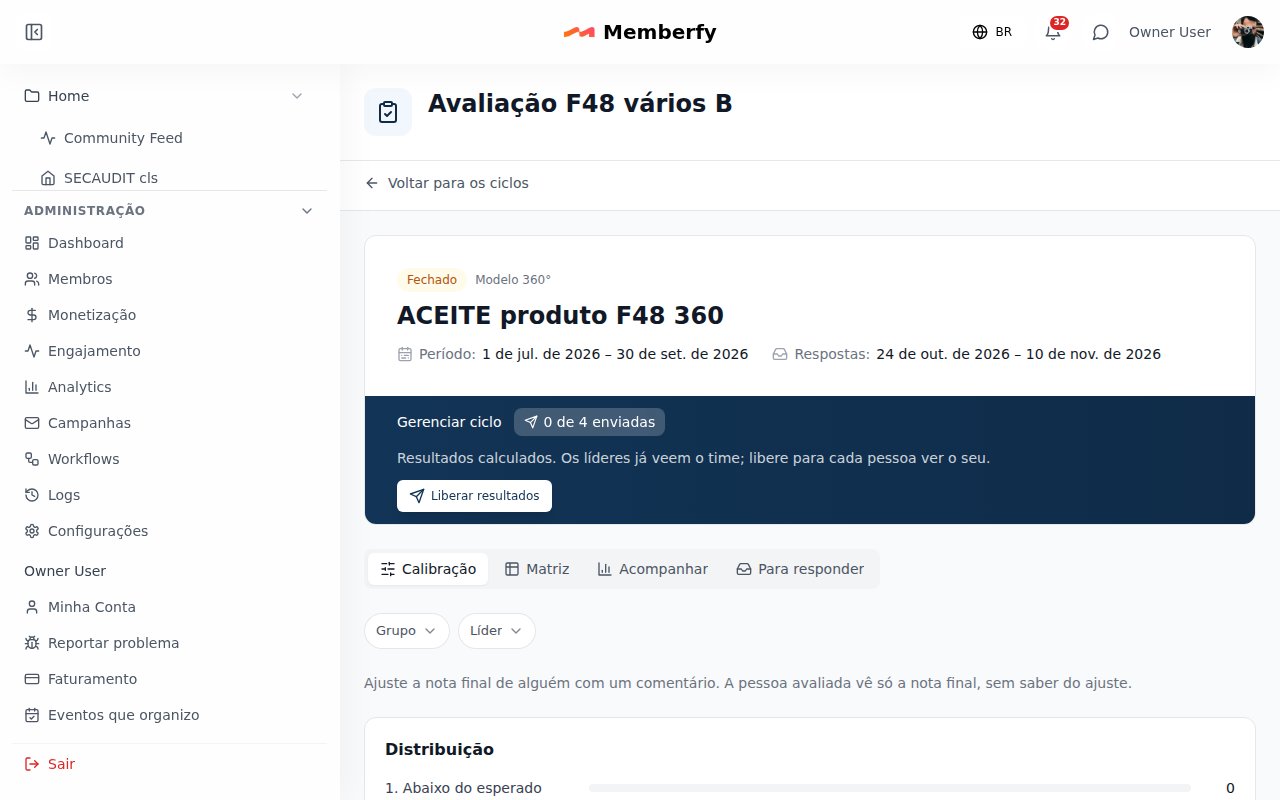
They live in the cycle's views: Nominations (each person nominates their peers; the direct leader, the owner or an admin approves, swaps or removes), Calibration (owner and admin, with filters by group and leader, the distribution and Adjust with a mandatory comment; read only after the release), 9-box and Matrix (with Download CSV). In the editor, Model and rating turns on reviewer nomination, with the minimum, the maximum and both deadlines, and the 9-box. In a person's result, after the release, the Development plan card and Take to the IDP, on a comment, create the action in the Development Plan. Also through the assistant.
- Peer nomination. In a cycle with peers, each person reviewed nominates the colleagues who will review them (3 to 5, or the cycle's minimum and maximum) until the nomination deadline: never themselves nor their own leader. The direct leader, the owner or an admin validates until the validation deadline: approves, swaps or removes each nominee; nobody decides their own nominations. The day after validation ends, pending nominations are approved on their own and whoever nominated nobody gets peers from the hierarchy (same leader).
- Calibration. With the cycle closed and before release, the owner or an admin adjusts a person's final level (from 1 to the scale's last level; with the default scale, 1 to 5) and, with the 9-box, their potential, always with a comment. The history keeps the previous value, the new one, the comment, who and when. The person reviewed never sees that it was adjusted; their leaders, the owner and admins see the Rating adjustment on the result. Nobody calibrates their own result.
- 9-box. In a cycle with the 9-box on, performance crosses with the potential given by the manager, with the people in each box. Performance comes from the final level, in thirds of the scale: the position is p = (level − 1) / (N − 1), low below 1/3, high above 2/3 and medium in between (edges included). With 5 levels: 1–2 low, 3 medium, 4–5 high; with 2: 1 low, 2 high; with 7: 1–2, 3–5 and 6–7; with 10: 1–3, 4–7 and 8–10. The editor shows the cycle's bands when you turn on the 9-box.
- Matrix. Person × topic, with the average of each relationship (peers and reports only from 3 answers), the calculated rating, the final level and the 9-box box, without comments; also as CSV.
- From the result to the Development Plan. After release, the person or their direct leader brings a point of the result into the Development Plan as an action with a due date; with no active plan, a draft plan is created with it.
The owner and admins see everyone; a leader, their own team; nobody sees their own row or box.
Through the assistant (MCP)
The owner and the admin build the cycle through the assistant (model, period, window, audience and questions), check what opening creates (with who has no manager), open it, follow progress, send reminders (the assistant first shows who gets them), add or cancel reviews, close and release. Opening, closing, releasing, reminding, canceling and deleting the draft ask for your confirmation. Anyone can list their own reviews, answer and send them, and check their own result; the leader checks the team's progress and results. See Tools · Members.
list_review_cycles returns, for the owner and the admin, each cycle's numbers (stats: participants and reviews in total, sent and pending).
The scale through the assistant and the API. scale_labels (create_review_cycle and update_review_cycle) and scaleLabels (POST /api/performance-reviews/cycles and PATCH /api/performance-reviews/cycles/{cycleId}, draft only; once open, 409 cycleNotDraft) take 2 to 10 names, worst first, and each level is worth its position; null or [] go back to the five defaults. A repeated name (ignoring case and accents) returns 422 scaleDuplicate; outside 2 to 10 or with an empty name, 422 scaleInvalid. An answer's rating (rating) and the calibration level (level) go from 1 to N, the cycle's scale.
Common errors and how to fix them
| Message | Why | What to do |
|---|---|---|
| While anyone has no manager, the cycle does not open. | A participant has no Reports to and the Manager relationship is on | Set the leader in Members or Take out of the cycle |
| Nobody in this cycle's audience. | Who takes part reaches nobody with access to the space | Review the audience in Details and audience |
| The cycle needs at least one question. | Every question was removed | Add one in Questions |
| There are unsaved changes. Save before checking the opening. | The editor has pending changes | Open the cycle saves whatever is pending before opening the window |
| The closing date comes after the opening. | Closes on before Opens on | Fix one of the dates |
| Review sent on … It no longer edits. | The review was already sent | Nothing to do: sending is final |