
Downsell
The discounted last chance, after payment, for each add-on the person didn't take. How to set up offers, when they appear, how long they last, how the discount carries into renewals, and how to measure it.
The downsell is the "last chance": when someone subscribes to a plan without taking an add-on that was on sale with it, the community offers that add-on at a discount, right after payment or a few hours or days later. Someone who said "no" at full price sometimes says "yes" at 10% less.
What it's for
| Community | Plan | Add-on declined | Last-chance offer |
|---|---|---|---|
| SaaS | Growth | Coworking Extension (R$ 450/month) | 10% off for as long as it lasts, right after subscribing |
| Online school | Student | Group mentoring (R$ 100/month) | 30% off the first charge, by email 2 days later |
| Coworking space | Resident | Locker (R$ 60/month) | 20% off for 6 charges, right after |
On the dashboard, the staff sees Add-ons (upsell) and Downsell; the buyer sees Add-ons and Last chance.
How it works
Where it's set up
A downsell belongs to one add-on within one plan. In Monetization › Plans, edit the plan: each add-on in the Add-ons (upsell) section has the Downsell: set up link (or Downsell: 2 offers · set up, when there are offers already). The add-on must be sold with the plan: "The product must be an add-on on this plan's list, sold together with it". And the plan must be saved: "Save the plan to set up this add-on's downsell."
The offer
| Field | Options | Default |
|---|---|---|
| Discount | Any percentage between 0 and 100, with up to 2 decimals | 10% |
| When to offer | Right after subscribing or After… (from 1 hour to 90 days) | Right after |
| The discounted price lasts | For as long as it lasts, Only the 1st charge or For N charges (2 to 36) | For as long as it lasts |
| Offer valid for | From 1 hour to 30 days | 48 hours |
| Active | Turns the offer on and off | On |
The Preview shows the effect on monthly and annual: "Monthly: R$ 450.00 → R$ 405.00/month, for as long as it lasts" and "Annual: R$ 5,400.00 → R$ 4,860.00/year".
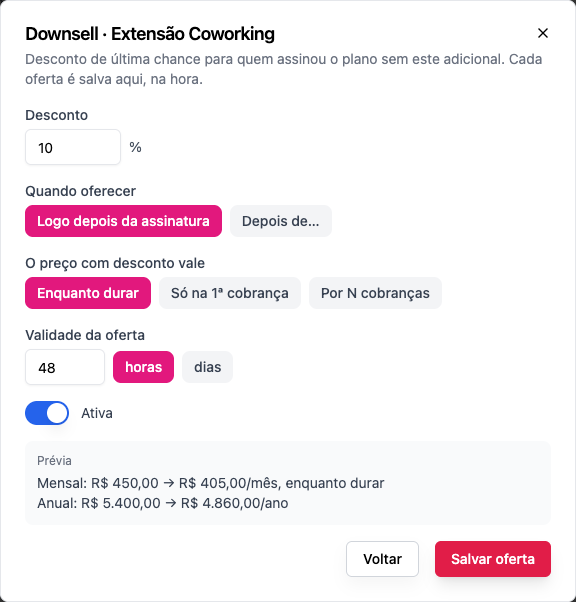
An add-on can have several offers (one immediate and another two days later, for example), but only one active immediate offer: "This add-on already has an active "right after" offer."
Who gets it
When a subscription to the plan starts, every add-on sold with the plan that the person didn't take generates the offer for them. These people don't get it:
- anyone who has had that add-on before and canceled it;
- anyone on a plan with a free trial.
Each person sees each offer once, and only until it expires.
When and where it appears
| Timing | Where |
|---|---|
| Right after subscribing | On the payment confirmation and in the Last chance block on the Billing page |
| After… | By email ("Last chance: Coworking Extension with 10% off"), with a one-click link, and on the Billing page. The email can arrive up to 1 hour after the scheduled time |
The email link opens a page in the community itself that works without signing in. Opening the link doesn't accept anything: the person has to click.
Accepting
The block shows the add-on, the discounted price and how long it lasts ("Discounted for as long as you subscribe", or "Discount on the 1st charge, then R$ 450.00"), what is paid today, and the time left ("Expires in 47 hours").
- Today's amount is prorated until the plan's next date ("Today: R$ 202.50 (prorated until 11/20)"). If the next charge is close, nothing is charged now: "Nothing charged now: it joins the plan's next charge, on 11/20."
- Saved card: one click ("Charge R$ 202.50 to card Visa •••• 4242."). PIX or boleto: generates the code, and the add-on is added once the payment clears.
- A coupon can be used too: I have a coupon.
- Add with discount confirms. No, thanks declines; the offer stays valid until it expires, in case the person changes their mind.
Accepting is a separate order, with its own R$ 2.49 fixed fee. From then on, the add-on is billed together with the plan, on the same date.
The discount on renewals
The discount follows the offer's rule: on the 1st charge, on the first N, or for as long as the subscription lasts. When the discount is about to end, the person gets an email 7 days before ("Your Coworking Extension discount ends soon"), and the next charge comes at full price.
The order of discounts
First the downsell, then the coupon, and the platform fee on the result.
Measuring
Each offer shows its numbers: "Shown 120 · accepted 18 (15%) · R$ 3,645.00 on the 1st payment · R$ 21,870.00 to date".
Who can
Set up offers: owner and admin.
Step by step: create an offer
Role: owner or admin.
- Have the add-on on the plan's list, sold with the plan. See Add-ons.
- Monetization › Plans, edit the plan.
- Under Add-ons (upsell), on the add-on, click Downsell: set up.
- Click Add downsell.
- Discount: 10% is preset; change it if you want.
- When to offer: Right after subscribing, or After… with the hours or days.
- The discounted price lasts: For as long as it lasts, Only the 1st charge or For N charges.
- Offer valid for: 48 hours by default.
- Check the Preview and click Save offer. It's saved right away, without saving the plan.
To change or remove it: Edit or Remove in the list of offers. When removing: "Whoever already got it can still accept it until it expires."
Examples with numbers
Growth Monthly (R$ 129) without the Coworking Extension; a 10% offer for as long as it lasts, right after. Coworking goes from R$ 450 to R$ 405 a month. The person accepts on the 5th; Growth renews on the 20th:
| Amount | |
|---|---|
| Today (15 of 30 days, prorated) | R$ 202.50 |
| Fee on this order | R$ 14.15 + R$ 2.49 = R$ 16.64 |
| From the 20th on, per month | R$ 129 + R$ 405 = R$ 534.00, in a single order |
| Monthly fee | R$ 37.33 + R$ 2.49 = R$ 39.82 |
| The community keeps, per month | R$ 494.18 |
The same offer, with the EXTRA5 5% coupon on top.
R$ 450 → R$ 405 (downsell) → R$ 384.75 (coupon).
A 30% offer on the 1st charge only, on the R$ 100 Mentoring add-on. First charge: R$ 70. After that: R$ 100.
Common errors and how to fix them
| Message | What to do |
|---|---|
| The discount must be more than 0% and less than 100%, with up to 2 decimals | Fix the discount |
| The delay must be between 1 hour and 90 days | Adjust After… |
| The number of discounted charges must be between 2 and 36 | Adjust For N charges |
| The validity must be between 1 hour and 30 days | Adjust the validity |
| This add-on already has an active offer right after subscribing | Deactivate the other immediate offer, or use After… |
| This offer is no longer available (for the buyer) | The offer expired or was used; the add-on can still be added at the regular price on the Billing page |
| Sign in to pay with a new card | On the link's page, a new card requires signing in; the saved card and PIX work |
Frequently asked questions
Does the downsell show up for people who already have the add-on? No. Only for people who subscribed to the plan without it, and never had it.
Can I have an immediate offer and a later one? Yes, and it's the most common combination: 10% right after, 20% two days later for those who didn't accept.
Does the discount apply to the plan? No: the downsell is always on the add-on. The plan stays at its own price.
What does the person see if they open the link after it expires? "This offer expired or is no longer available", with a shortcut to the Billing page, where they can still add the add-on at the regular price.
In the API
Offers live at /api/subscription-groups/{groupId}/downsell-offers (owner and admin). For the buyer, /downsell-impressions, and for the email link, /downsell-impressions/by-token/{token}, whose GET has no side effects.