
Member billing
The page for whoever pays: subscriptions and dates, saved cards, billing history, changing plans, canceling and reactivating, the open renewal, Pay now, extensions and the last chance.
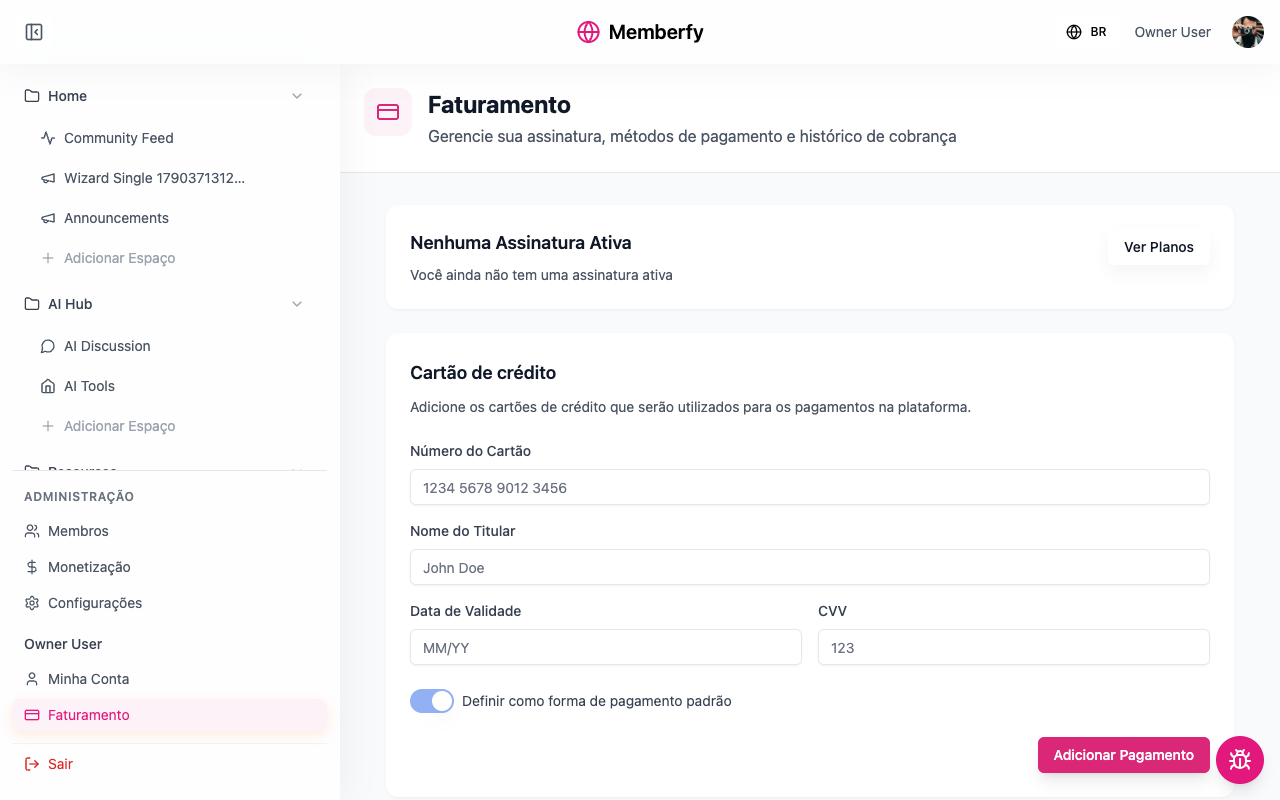
Every member has a Billing page, in the menu, under their own name. It is the payer's area: everything they subscribe to in that community, their cards and their charges.
What it's for
So the member can sort out on their own what would otherwise become a message to the team: "when is the next charge?", "I want to change my card", "I want to switch to the yearly plan", "I want to cancel", "I didn't pay the boleto, now what?".
What's on the page
| Block | What it shows and what you can do |
|---|---|
| The plan card | The plan, the status and the price ("R$ 129.00/month (min. 12 months)"); the subscription details; the extensions; the open renewal; the last-chance offers; and the actions. With no subscription: "No active subscription" and See plans |
| Credit card | "The default card pays your subscription renewals." The saved cards; Add Payment; Set as default payment method; remove |
| Billing history | "The charges of your subscription." Each charge with its period ("10/01 to 11/01"), the amount and "Paid on…" or "Not paid", page by page |
The plan card
Each detail shows as a label and a value, only when it applies:
| Label | When it shows |
|---|---|
| Next charge | Up to date: the amount and the date ("R$ 579.00 on 11/20"). Hidden while the subscription is past due |
| Trial ends | During the free trial |
| Coupon on the next charge | When a coupon still applies to the next charge |
| Contract until | With a contract length |
| Access until | Canceled, still within the paid period |
| Extensions | Each add-on, with its price and discount, if any |
| Scheduled change | A plan change waiting for the end of the period: "On 11/20, your plan switches to Growth · Annual (R$ 1,188.00/year).", with Undo |
A yearly plan shows "Annual · renews on…". An ended subscription shows "Subscription Ended" — "Your subscription ended on…".
Statuses: Active, Trial, Past Due, Canceled, Expired.
The actions
| Action | When |
|---|---|
| Pay now | The renewal is overdue: "The renewal was not paid. Pay to keep your access." It is the only highlighted button. See Pay now |
| Add an extension | The plan has add-ons the person doesn't have yet. Not during the free trial: "Extensions can be added once the trial ends." |
| Change plan | Active subscription, with no scheduled cancellation. Opens the Change plan dialog. See Change plan |
| Cancel subscription | The option allows cancellation |
| Reactivate | Canceled, while the paid period isn't over |
The open renewal
On a subscription paid by PIX or boleto, the renewal charge is generated 5 days before the due date and shows on the card: "Renewal: pay by 11/15 · R$ 129.00", with the PIX copy-and-paste code (and the QR code, when there is one) or the boleto link and barcode. A card under review shows "Payment under review: … The subscription updates once it is confirmed." See Renewal.
Last chance
If the community offers a downsell for an add-on that was left out, the Last chance block shows the offer: "A discount to add the add-ons you left out to your plan.", with the price and how long the discount lasts.
Step by step
Change the renewal card
Role: the member themselves.
- Billing › Credit card, Add Payment.
- Card Number, Card Holder Name, Expiry Date and CVV.
- Check Set as default payment method.
- Confirm. Future renewals go to this card.
Cancel the subscription
Role: the member themselves.
- On the plan card, Cancel subscription.
- If you want, give the reason under Reason for canceling (optional).
- Confirm with Yes, Cancel Subscription.
| Situation | What happens |
|---|---|
| No contract | "You keep access, with no new charges, until…" |
| With a contract | "The cancellation is scheduled for that date, and monthly charges continue until then." |
| The option doesn't allow cancellation | "This plan does not allow cancellation. Please contact the community." |
Add an extension
- On the plan card, Add an extension: "It is billed with your plan, on the same date."
- Choose the extension. The dialog shows what is charged today ("Today: R$ 150.00 (prorated until 11/20)") and afterwards ("Then: R$ 450.00 with the plan, every charge.").
- Add and pay.
Reactivate a canceled subscription
While the paid period isn't over, Reactivate undoes the cancellation: "Reactivate your subscription and keep your benefits", with the next charge on the usual date. After the period ends, it is no longer possible: "Cannot reactivate subscription - the subscription period has already ended". Then the only way is to subscribe again.
Change plan
Role: the subscriber themselves. Only the subscriber changes their own plan; the team does not change anyone's plan.
The subscription changes in place: it is the same subscription, with the same history, just on another billing option. There is no need to cancel one and subscribe to another.
Where it is
- Billing, on the plan card, Change plan.
- The dialog shows "You are on Growth · Monthly. Choose the option you want to switch to." and the list of options the community shows on its pricing page, by plan, with yours marked Your plan. Options with the other billing interval (yearly, if you are on monthly) show the note "Different billing interval: the switch takes effect at the next renewal."
- Choose an option. The dialog works out what changes ("Working out what changes in your subscription...") and shows the summary before any charge.
- Confirm with Pay R$ … and switch, Switch now or Schedule change, depending on the case.
When the change takes effect now
It takes effect now when the new option is more expensive, with the same billing interval, and none of your extensions would end on the new plan. The dialog title is The change takes effect now:
- We charge now, to your default saved card, the difference prorated for the days left until renewal: "You move to Business · Monthly today. We charge R$ 130.00 to your saved card now (prorated for the 15 days left until renewal)."
- The amount includes the platform fee when, on the new option, the buyer pays the fee.
- On a yearly option that accepts installments, the amount can be split under Installments (up to one installment per month left, within the option's limit).
- If the difference is too small (fewer than 3 days left or less than R$ 10), the switch happens with no charge: "You move to Business · Monthly today, with no charge now: the difference until 11/20 is too small to charge."
- After that, the next charge comes at the new price, on the same date as always.
When the change is scheduled
It waits for the end of the period you already paid for (The change is scheduled) when the new option is:
| Case | The reason the dialog shows |
|---|---|
| Cheaper | "A cheaper option starts at the end of the period, so you keep what you already paid for." |
| The same price | "An option at the same price starts at the end of the period you already paid for." |
| A different billing interval (monthly to yearly, or the other way) | "The billing interval changes at renewal, with no proration between periods." |
| More expensive, but without an extension you have | "One of your add-ons doesn't carry over to the new plan, so the change waits until the end of the period you already paid for it." |
The dialog says until when you stay on the current plan and what comes next: "You stay on Growth · Monthly until 11/20, the end of the period you already paid for. From then on, Growth · Annual at R$ 1,188.00/year." Nothing is charged now.
What the dialog shows before you confirm
| Line | Example |
|---|---|
| The amount now | "We charge R$ 130.00 to your saved card now", with the card ("Visa card ending in 4242") |
| The next charge and its total | "Next charge on 11/20: R$ 839.00." (the plan plus the extensions that continue) |
| The extensions | "Coworking Extension continues, at R$ 450.00." or "Coworking Extension ends with the change." |
| The contract | "Your minimum term still runs until 03/15/2027." or "The new plan has a 12-month minimum term, until 11/20/2027." |
| The coupon | "Your discount coupon only applies to the current plan and stops with the change." |
| A change already scheduled | "This replaces the change already scheduled to Growth · Annual." |
No saved card
A change that takes effect now needs a saved card: "To switch now, you need a saved card. Add one under Credit card, on this page." The confirm button stays disabled; Add card opens the card form on the same page. A scheduled change doesn't need a card.
Declined card or payment down
If the card is declined or payment processing doesn't respond, nothing changes and nothing is charged: "Nothing changed in your subscription: you're still on your current plan and nothing was charged.", with the reason. You can try again or use another card.
Undo a scheduled change
- On the plan card, the Scheduled change notice, Undo.
- "Undo the scheduled change?": "You stay on Growth · Monthly, and your next charge stays as it is."
- Undo change.
Undoing is no longer possible once the PIX or boleto for that period's renewal has been generated (5 days before the due date, see Renewal): the dialog says "The scheduled change still stands." For the same reason, while that renewal is open you can't change plans: "A renewal charge is still open. Change plans after it is paid."
What carries over and what doesn't change
| The history | It is the same subscription: charges, dates and timeline carry over |
| The extensions | The ones the new plan offers continue, at its price; the others end with the change |
| The contract | A contract in progress runs until its date; if the new plan has a contract, it starts at the change |
| The coupon | Only applies to the option it was used on; it stops applying with the change |
You can't change plans during the free trial, with the subscription past due, with a scheduled cancellation or on a complimentary subscription: "Only an active subscription with no scheduled cancellation can change plans."
Through the assistant, the same switch comes from the tools quote_plan_change and change_my_plan.
For the team: how to help a member
| The member says… | Where they sort it out | If that doesn't work |
|---|---|---|
| "I want to change my card" | Billing › Credit card | — |
| "When is the next charge?" | Billing, on the plan card | — |
| "I want to switch to the yearly plan" or "to a bigger plan" | Billing › Change plan | The team doesn't change a member's plan: only they can |
| "I scheduled a switch and changed my mind" | Undo, on the Scheduled change notice | Once the renewal PIX or boleto is out, the switch stands |
| "I canceled by mistake" | Reactivate, while the paid period isn't over | Subscribe again |
| "I didn't pay the renewal" | Pay now, or the open renewal PIX | An owner or admin helps through the API |
| "I want to cancel and the option doesn't allow it" | — | An owner or admin cancels |
| "I want to cancel in the middle of the contract" | The cancellation is set for the end of the contract | An owner or admin ends it earlier, by agreement |
Examples
Ana subscribes to Growth Monthly with the Coworking Extension. She sees the plan (Growth · Monthly, R$ 129.00), the add-on (Coworking Extension, R$ 450.00/month) and "Next charge: R$ 579.00 on 11/20".
Bruno subscribes to Resident with a 12-month contract and cancels in month 4. He sees "Cancellation scheduled for 03/15/2027, the end of your contract. Monthly charges continue until then."
Diego is on Growth Monthly (R$ 129) and switches to yearly (R$ 1,188). The billing interval changes, so the switch is scheduled for the end of the month already paid. The card shows "Scheduled change: On 11/20, your plan switches to Growth · Annual (R$ 1,188.00/year).", and the 11/20 charge already comes at the yearly price.
Carla paid the yearly plan by PIX. She sees "Annual · renews on 10/10/2027". Five days before, the open renewal appears with the new PIX.
Common errors and how to fix them
| Message | What to do |
|---|---|
| Failed to add payment method | Check the card details; try another card |
| We don't recommend removing your default payment method. Set another card as default first. | Set another card as default before removing it |
| Cannot reactivate subscription - the subscription period has already ended | Subscribe again under See plans |
| Failed to load subscription | Reload the page |
| Only an active subscription with no scheduled cancellation can change plans. | Wait for the trial to end, pay the overdue renewal or reactivate the subscription first |
| A renewal charge is still open. Change plans after it is paid. | Pay the renewal PIX or boleto and go back to Change plan |
| Nothing changed in your subscription: you're still on your current plan and nothing was charged. | The card was declined or the payment didn't respond; try again or use another card |
Frequently asked questions
Does the member see charges from other communities? No. Billing belongs to the community they are in.
Does the team see a member's Billing page? The team sees sales and subscriptions under Monetization; Billing is the member's own view.
Can the member pause the subscription? Not from the page. Pausing is a team action, and a paused subscription gives no access until it is resumed.
When I move to a more expensive plan, do I pay the new plan's whole month? No. You only pay the difference prorated for the days left until renewal. From the renewal on, the new price.
What if I move to a cheaper plan? The switch waits for the end of the period already paid. The difference isn't refunded: you use the current plan until then.
Where is the invoice? The invoice is issued by the community, outside the platform.