
Invite members
The three ways to bring people into the community (email invite, New Member and open sign-up), who can invite and with which role, what each person receives, and the catch with bulk invites.
There are three ways for someone to join the community: you invite them by email, you create the member with their details already filled in, or they sign up on their own. This article covers all three, what each person receives and the rules about roles.
What each one is for
| Path | When to use it | Example |
|---|---|---|
| Invite Members | One or more people you already know | A school's class of 30 students; the 12 residents of a coworking space |
| New Member | One person, with name, job title and photo already filled in | The new HR manager, added by the team |
| Open sign-up | Anyone with the address can join | An open community that grows by word of mouth |
| Purchase | Whoever subscribes to a plan or buys a product joins when they pay | A course sold to people who aren't members yet |
How it works
Who can invite
The owner and admins. A moderator can see the Members screen, but inviting is refused: "You do not have permission to invite members to this community."
With which role
In an invite and in New Member, the Role can be Member, Moderator, Admin or Finance. Nobody joins as Owner through an invite: to have another owner, invite the person as an admin and then, as an owner, promote them. See Roles and permissions.
The invite puts the person in the community right away
There is no "pending acceptance". The moment you send the invite, the person is already a member, with the role you chose:
- someone who doesn't have a Memberfy account yet gets one, with no password, and receives a link to set their password;
- someone who already has an account (from another community) gets a notice that they were added and signs in with the login they already use;
- someone who is already a member of this community is refused: "Already a member of this community".
Who gets an email
| Situation | |
|---|---|
| A person without an account (inviting one or several people, or New Member) | You're invited to…, with the Set my password button |
| A person who already had an account | You were added to…, with the Sign in button |
| Open sign-up | Welcome email |
Every invitee gets an email, even in a bulk invite with dozens of addresses.
The link to set the password
- It's valid for 7 days and can only be used once.
- It opens the community's Set your password page: the person types the password twice and then signs in with their email and the new password.
- The password needs at least 8 characters, with an uppercase letter, a lowercase letter and a number.
- Nobody, not even whoever sent the invite, ever knows the password: invites no longer come with a temporary password.
| What shows up | What to do |
|---|---|
| This link has expired. | The 7 days are up. The person uses Forgot password? at sign-in, or you invite them again |
| This link was already used. | The password is already set. Sign in with it, or use Forgot password? |
| Invalid link. | The link was only partly copied. Open it straight from the email, or use Forgot password? |
Default groups
If the community has a default group ("Everyone joins this group"), newcomers join it automatically. See Groups and org chart.
Step by step: invite by email
Role: owner or admin.
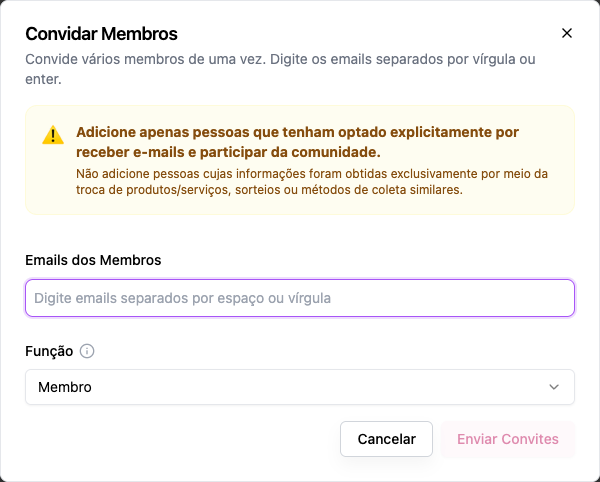
- Administration › Members, Invite Members button.
- In Member Emails, type the emails, separated by commas, spaces or Enter.
- In Role, choose the role for all of them.
- Send Invites. The screen tells you how many succeeded and how many failed: "28 invites sent successfully. 2 failed."
Step by step: New Member
Role: owner or admin.
- Administration › Members, New Member button.
- Full Name and Email (required), Title (the job title, e.g. Senior Product Manager), Role and, optionally, the Avatar (JPG, PNG or GIF, up to 2 MB).
- Add Member. The person receives the email with the link to set their password.
Step by step: open sign-up
Role: owner or admin.
In Settings › General › Access Control, turn on Allow New Sign-ups. Anyone who opens the community's address sees Sign Up. See Sign-up and access.
Good practice: only people who asked
The screen itself reminds you: "Only add people who have explicitly opted in to receive emails and participate in the community. Do not add people whose information was obtained solely through the exchange of products/services, giveaways or similar collection methods." Besides being the right thing to do, it keeps the community's emails out of spam.
Examples
A school with a class of 30 students.
- Create the group March class.
- Invite all 30 emails at once as Member.
- Put the 30 in the group (in the group itself, Who is in this group).
- Each student receives the email with Set my password. It's worth telling the class to look for it, including in spam.
- The class's space, opened to the group, shows up for them.
A coworking space with a new resident. New Member with name, email, title (Designer at Studio X) and photo, as Member. They get the email to set their password and already appear on the board.
A company bringing in its accountant. Invite the accountant alone, as Finance. They get the email and see only Monetization.
Common errors and how to fix them
| Message | What to do |
|---|---|
| Add at least one email | Type an email |
| Already a member of this community | The person is already in; change their role in Members if needed |
| You do not have permission to invite members to this community. | Ask an owner or an admin |
| You do not have permission to assign the owner role. | Invite as admin and promote later |
| Name and email are required (New Member) | Fill in both |
| The person says they got nothing | Ask them to check spam. If the link has already expired, point them to Forgot password? |
Frequently asked questions
Can I import a spreadsheet of members? There is no spreadsheet import. Paste the emails into Invite Members, up to a few dozen at a time.
Does the invite expire? There is no pending invite: the person is a member from the moment it's sent. What expires is the link to set the password, after 7 days; after that, they get in through Forgot password?.
Can I invite someone as a subscriber? The invite grants a role, not a subscription. To open a paid space to an invitee, put them in a group and open the space to that group.
I invited someone with the wrong role. Change it in Members by editing the person. See Manage members.
In the API
POST /api/profiles/invite (emails, role) and POST /api/profiles/create. See Profiles.