
Coupons
Discount codes as a percentage or a fixed amount, for the first charge, forever or for N months, with a validity period, a usage limit and applicable products. How the discount works at checkout and on renewals, and the messages buyers can see.
A coupon is a code buyers type at payment to get a discount: LANCAMENTO20, BEMVINDO10, ALUNO2026. It's for launches, partnerships, campaigns, and winning back people who gave up.
What it's for
| Community | Coupon | What it does |
|---|---|---|
| Online school | LANCAMENTO20 | 20% off the first monthly payment of the Student plan, up to 100 uses |
| Coworking space | PARCEIRO30 | R$ 30 off a month for the first 3 months of the Resident plan, for the partner only |
| SaaS | ANUAL10 | 10% off forever, on annual options only |
| Event | GRUPO15 | 15% off the ticket, valid until the day before |
How it works
Types
| Type | Discount | Example |
|---|---|---|
| Percentage | A percentage of the amount | 20% of R$ 129 = R$ 25.80 |
| Fixed Amount | An amount in reais, per order | R$ 30 off |
| Free Trial | Extra trial days | +7 trial days |
Duration (for subscriptions)
| Duration | On screen | The discount applies |
|---|---|---|
| once | Discount applied only on first payment | Only on the first charge |
| forever | Discount applied on all payments | On every charge, renewals included |
| repeating | Discount applied for N months | On the first N charges |
On a product sold once, the duration makes no difference: there's only one charge.
Limits
| Field | What it's for |
|---|---|
| Start Date * | When the code starts being valid |
| End Date | Until when. Left blank, it doesn't expire |
| Maximum Uses | How many times the code can be used in total. Left blank, unlimited |
| Maximum per User | How many times the same person can use it |
| Applicable Products | Which products and options it applies to. Empty: all of them |
Through the API, a coupon also takes: a minimum order amount, a maximum discount, first purchase in the community only, subscriptions only, one-time products only, excluded products, and whether it can be combined with another coupon.
How the discount works at payment
- At checkout, the buyer clicks I have a coupon, types the code and clicks Apply. The screen shows "Coupon LANCAMENTO20 applied · −R$ 25.80" and the duration ("Discount on the first charge only.").
- The discount is calculated before the fee: the platform fee applies to the amount after the discount.
- On an order with a plan and add-ons, a fixed-amount coupon is taken once off the order, split across the items in proportion to each one's amount; a percentage applies equally to each item it covers.
- No item can go below R$ 1.00 after the discount.
- The use is recorded when the payment is confirmed. An open order (an unpaid boleto, for example) holds a use for up to 7 days.
- On renewals, forever and repeating coupons keep applying for the agreed time.
- With a downsell, the downsell discount comes first, then the coupon's.
The Free Trial type isn't accepted at payment ("This type of coupon cannot be used at checkout").
Status
The list shows each coupon with its uses, validity and status:
| Status | Meaning |
|---|---|
| Active | Valid |
| Inactive | Paused by you |
| Expired | Past the end date |
| Exhausted | Reached the maximum uses |
Who can
Create, edit, pause and delete: owner and admin. Finance sees the coupons and their usage history.
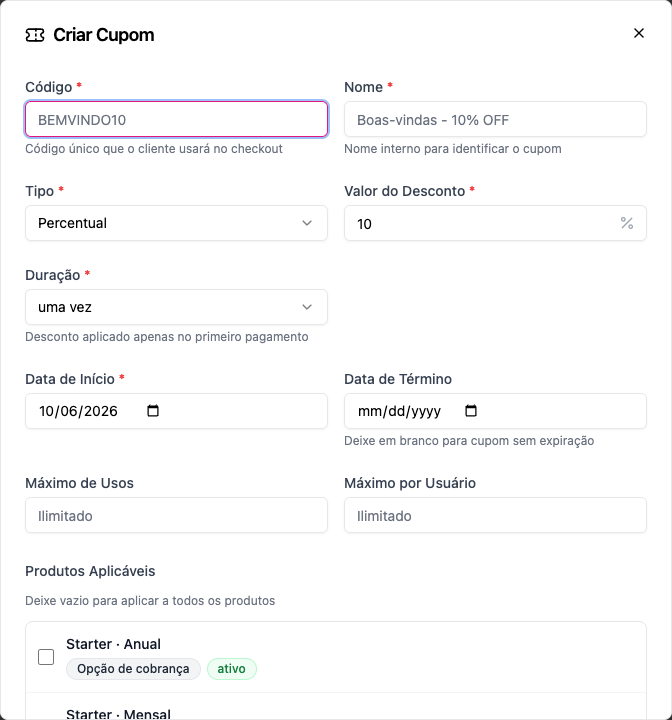
Step by step: create a coupon
Role: owner or admin.
- Monetization › Coupons › Create Coupon.
- Code *: what the customer types (e.g.
LANCAMENTO20). Unique within the community. - Name *: for the staff (e.g. March launch — 20%).
- Type * and Discount Value *.
- Duration *: once, forever or repeating (with the Months).
- Start Date * and, if you want, End Date.
- Maximum Uses and Maximum per User, if you want to limit it.
- Under Applicable Products, tick where it applies, or leave it empty to apply everywhere.
- Create.
To pause it, change the status to Inactive. Deleting a coupon that has been used affects reports: the screen tells you how many times it was used.
Examples with numbers
The platform fee is 6.99% + R$ 2.49 on the amount charged, after the discount.
LANCAMENTO20: 20% once, on Growth Monthly (R$ 129).
First monthly payment: R$ 129.00 − R$ 25.80 = R$ 103.20. Fee: R$ 7.21 + R$ 2.49 = R$ 9.70. The community keeps R$ 93.50. From the second payment on, R$ 129.00.
ANUAL10: 10% forever, on Student Monthly (R$ 49).
Every month: R$ 44.10. Fee: R$ 3.08 + R$ 2.49 = R$ 5.57. The community keeps R$ 38.53 a month, for as long as the subscription lasts.
PARCEIRO30: R$ 30 repeating for 3 months, on Resident (R$ 890).
Months 1 to 3: R$ 860.00. From month 4 on: R$ 890.00.
A R$ 50 fixed amount on a plan + add-on order (R$ 129 + R$ 450 = R$ 579). The discount is R$ 50 on the order, split proportionally: R$ 11.14 on the plan and R$ 38.86 on the add-on. Total: R$ 529.00.
A R$ 100 fixed amount on a R$ 49 plan. Refused: the item would go below R$ 1.00.
Good practices
- One code per campaign.
INSTAGRAM20andNEWSLETTER20with the same discount show where each sale came from, in the Uses column. - Always set an end date on campaigns: a forgotten coupon becomes a permanent discount.
- Maximum Uses on partnerships, so a leaked code doesn't become the rule.
- Prefer "once" or "repeating" to "forever": "forever" reduces every renewal for as long as the person stays.
- Test before you promote it: apply the code at checkout with a member account and check the total.
Messages buyers can see
| Message | Why |
|---|---|
| Invalid coupon code | The code doesn't exist |
| Coupon has expired | Past the end date |
| Coupon is not yet valid | Before the start date |
| This coupon is not active | It's paused |
| Coupon usage limit has been reached | Exhausted |
| You have already used this coupon as many times as allowed | Maximum per user |
| This coupon does not apply to this product | The product isn't among the applicable ones |
| This coupon applies to orders of R$ X or more | Minimum amount |
| This coupon is only valid for your first purchase in this community | First-purchase restriction |
| With this coupon an item would cost less than R$ 1.00, the least that can be charged | The discount is larger than the price |
| Too many invalid coupon codes. Try again in a few minutes. | 10 codes refused within 15 minutes |
| The coupon is no longer valid and was removed. Nothing was charged; check the new total and try again. | The coupon expired or ran out between applying it and paying |
Common errors when creating
| Message | What to do |
|---|---|
| A coupon with this code already exists in this community | Use another code |
| Enter how many months the repeating coupon lasts | With repeating, fill in the Months |
| Extra trial days only apply to free trial coupons | Remove the extra days, or change the type |
Frequently asked questions
Does the coupon apply on renewal? Forever and repeating coupons do, for the agreed time. Once coupons apply only to the first charge.
Can two coupons be used? Only if both can be combined. By default, one coupon per order.
Does the coupon reduce the platform fee? The fee is calculated on the discounted amount: a lower price also means a lower fee in reais.
Can a member use a coupon when adding an extension later, from the Billing page? Not for now; coupons apply when buying the plan and on the last-chance offer.
How do I know how many times a coupon was used? In the Uses column of the list, and in the coupon's usage history.
In the API
POST /api/coupons, PUT .../coupons/{id}, PATCH .../coupons/{id}/status, GET .../coupons/{id}/usage and POST .../coupons/validate (code, productId, amount). At checkout, couponCode in POST /api/checkout/calculate-price and in POST /api/checkout. See Coupons.