
Releases
Integrations & APIs arrives in Settings, with personal API keys so your CRM, n8n or a script can call the API with per-module permissions, and webhooks that notify those systems the moment someone joins, buys, subscribes, registers for an event or completes a course. And the ready-made integrations arrive: Discord, Slack, Telegram, RD Station and HubSpot turn on in a few clicks. The platform also got new security controls.
Integrating the community with another system no longer requires an account just for that: each person creates their own key, checks what it may do and revokes it whenever they want. And, the other way around, the community now notifies your systems on its own.
- Personal API keys, with per-module permissions
- Webhooks in Integrations & APIs
- Ready-made integrations: Discord, Slack, Telegram, RD Station, HubSpot and shortcuts to Zapier, Make and n8n
Personal API keys, with per-module permissions
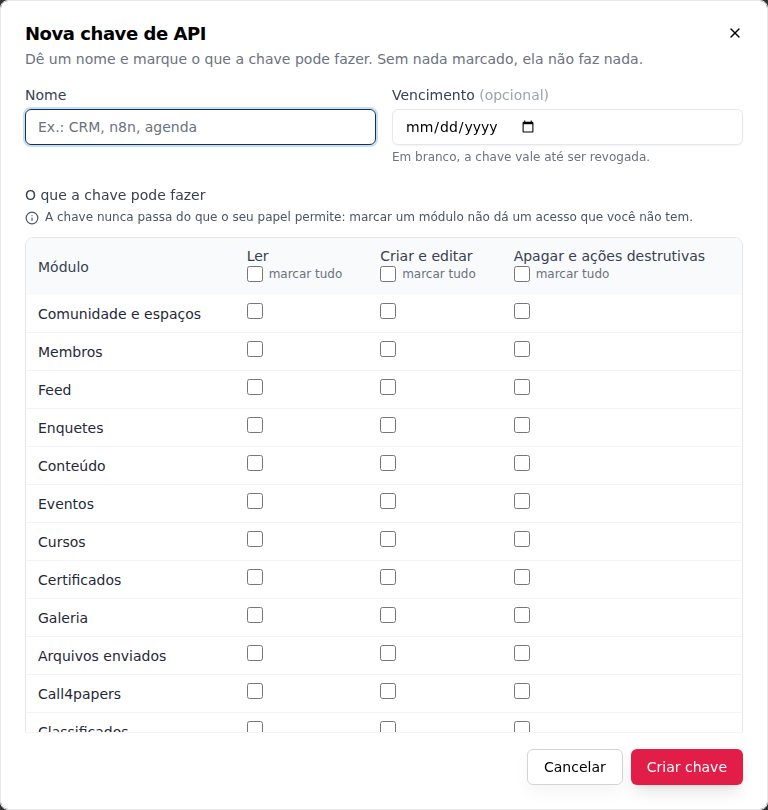
What it is. A key that a CRM, an automation (n8n, Zapier, Make) or a script uses to call the community's API on your behalf, without signing in. When you create it, you check, module by module, what it may do: read, create and edit and delete and destructive actions. With nothing checked, the key does nothing, and it never goes beyond what your role allows.
Why it matters. Before, an integration needed a member just for it, with the email and password stored in the outside system, and with all the power of that member's role. Now the key does only what you unlocked, can have an expiration and a list of IPs, and stops working the moment it is revoked. Money (refunds, payouts, checkout, cards), the account (password, sign-in, email, phone) and managing the keys themselves are out of reach of any key.
Where it is. Owner and admin: Settings, Integrations & APIs tab. Other roles: Integrations & APIs, in the account menu, below Billing.
How to start.
- Click New key, give it a name and check only the modules and columns the integration needs.
- If you want, add an expiration and the IPs of the server that will call.
- Copy the key right away: it is shown only once.
Example. Rafael, an admin, creates the CRM key with read on Members and on Sales and subscriptions, locked to the CRM server's IP. The CRM starts pulling new subscribers on its own. Owner and admin see all of the community's keys in All in the community, can revoke any of them and follow the month's calls in the Usage block. See Integrations & APIs.
Webhooks in Integrations & APIs
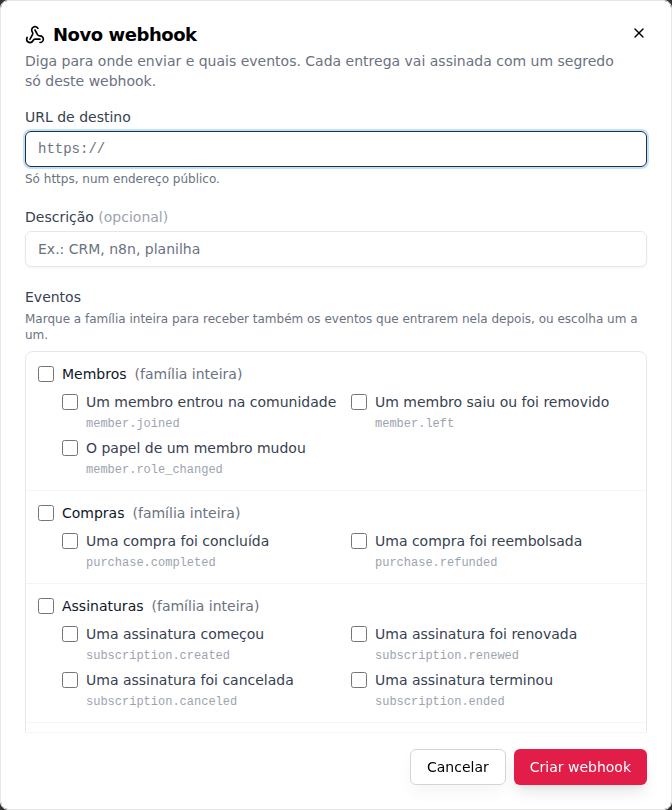
What it is. Notify your CRM, Zapier, Make or n8n when someone joins, buys, subscribes, registers for an event or completes a course. You register the destination URL, pick the events (13, in 6 families) and Memberfy sends a signed notice the moment it happens.
Why it matters. Before, to learn about a purchase or a new member, the outside system had to ask the API every so often. Now the notice arrives on its own, with the person's name and email, and the spreadsheet, the CRM or the team's group update in seconds. If the destination goes down, Memberfy keeps trying for almost two days and, if it doesn't come back, disables the webhook and sends an email.
Where it is. Settings, Integrations & APIs tab, Webhooks tab. Owner and admin.
How to start.
- Click New webhook, paste the URL Zapier, Make or n8n gave you and check the events (the whole family or one by one).
- Copy the secret: it's shown only once, and it's how the destination checks that the notice came from Memberfy.
- Click Send test and see the destination's answer.
Example. Julia, the owner, connects the Purchases family to a Zapier trigger. Each completed purchase becomes a message in the team's channel. In the webhook's Deliveries section she sees each send, with the destination's answer, and resends what failed. If the destination's firewall only accepts known addresses, the Send from fixed IPs option makes deliveries come from two Memberfy IPs. See Integrations & APIs › Webhooks.
Also new: the Usage block now counts the webhooks delivered each month, and the Administration › Logs page gets the API keys type, with everything the keys did. See Logs › API keys.
Ready-made integrations
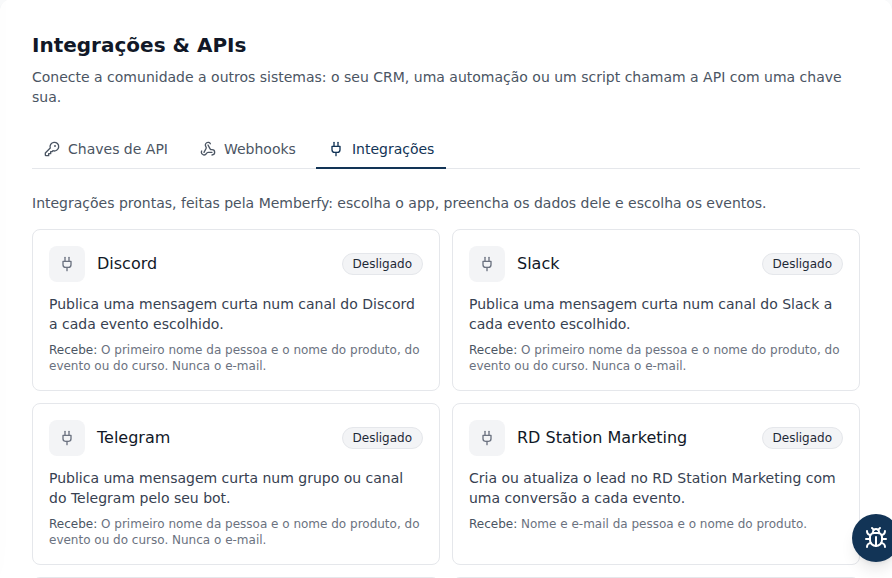
What it is. Ready-made integrations: Discord, Slack, Telegram, RD Station, HubSpot and shortcuts to Zapier, Make and n8n. You pick the app, paste its credential, check the events and turn it on. No automation in between and no code.
Why it matters. Before, telling the team on Slack about each purchase, or taking new members to the CRM, took a webhook and a hand-built automation. Now the message reaches the channel ("Maria bought Career Mentoring.", with only the first name, in the community's language), the lead shows up in RD Station with the conversion, and the HubSpot contact gets the deal for the purchase and the renewal, without duplicates.
Where it is. Settings, Integrations & APIs tab, Integrations tab. Owner and admin.
How to start.
- Click the app's card and follow the "How to connect …" guide to create the URL, token or key at the provider.
- Paste it, check the events and confirm what the app will receive.
- Click Turn on and then Send test.
Example. Júlia turns Telegram on: she creates the bot in BotFather, adds it to the team's group and uses Find my group. With each event registration, the group gets "Maria registered for October Meetup.". Disable pauses and keeps the settings; Remove integration deletes the credential and the delivery history. If the provider fails for 72 hours, the app is turned off and the owner and admins get an e-mail. See Ready-made integrations.
Improvements
- Edit webhooks. Before, changing a webhook's URL, events or fixed IPs meant creating another and deleting the old one. Now the detail has Edit, without changing the secret: deliveries already under way keep going to the old destination, changing the URL resets the failures and editing does not turn it back on. See Edit a webhook.
- New security controls.
- Website: the Platform page on memberfy.net gets an Integrations & APIs section, which shows the ready-made integrations as available, and the home page and the For Communities, For HR and For Coworkings pages now mention it with examples.
For developers
API
API key (
X-Api-Key) instead of the token, always with theX-CommunityIdof the key's community; withAuthorizationas well,400. The key acts as its owner and the effective permission is the scope (<module>:<level>, 28 modules,read/write/delete) and, at the same time, the owner's current role. On a public route, a key without the scope proceeds as anonymous. See Authentication › API key.Limit of 120 calls per minute per person in each community, adding up their keys, with
429andRetry-After. Allowed IPs per key (up to 20, IPv4, IPv6 or CIDR).Errors with a stable
code:API_KEY_SCOPE_MISSING,API_KEY_BLOCKED,API_KEY_ROUTE_NOT_COVERED,API_KEY_IP_NOT_ALLOWED,API_KEY_RATE_LIMITED,API_KEY_WITH_AUTHORIZATIONandAPI_KEY_PATH_INVALID. See Responses and errors./api/integrations/api-keysroutes (list, create, view, rename and change IPs, revoke, usage) and/api/integrations/usage, with the sign-in token only. See API reference › Integrations.The specification gets the
apiKeyscheme, and each operation states the scope the key needs or that it doesn't accept a key; the reference shows this next to API key.GET /api/activity-logsgets theapiKeyssource: key created, renamed, with IPs changed, revoked, and every write made with a key ("via key {name}").Webhooks (Standard Webhooks): the envelope (
id,type,version,occurredAt,community,data), the 13 events and theping, thewebhook-id/webhook-timestamp/webhook-signaturesignature with a Node example (standardwebhooks), deduplication bywebhook-idand no guaranteed order. 8 attempts (1 min, 5 min, 30 min, 2 h, 6 h, 12 h, 24 h, about 45 h);410disables right away; 72 h without success disables, with an email to owner and admins;429honorsRetry-Afterand doesn't count as a failure.httpson port 443 only, no redirects, 10 s. See Webhooks.Webhook events: the reference generated from the public catalog
GET /api/integrations/events, with each event's JSON Schema.Fixed IPs:
3.227.95.35and34.199.138.158, to allow in the firewall.Management at
https://developers.memberfy.net/api/webhooks(sign-in token of an owner or admin, never an API key). Creating, sending a test, turning back on, resending and changing the URL share a limit of 10 per minute per community; up to 10 webhooks per community.Edit webhook:
PATCH /api/webhooks/{id}(url,description,events,fixedIps, only what changes). Applies to later events; deliveries under way keep their destination; changing the URL resetsfailureCount; does not turn it back on;updatedhistory line with before and after. See Webhooks › Edit a webhook.Ready-made integrations:
/api/appsathttps://developers.memberfy.net(catalog, installationPUT/DELETE, with?remove=trueto remove, test,POST /api/apps/telegram/chats, deliveries and resend), with the same owner or admin token. See Webhooks › Ready-made integrations.GET /api/logsacceptstype=apiKeys, withactor.via=api_keyon calls made with a key.
MCP: technical details
list_integrations(new, read-only, any role):scope: mine(default) lists your keys;scope: community(owner and admin) lists everyone's, withmember_idandstatus. Scopes come with the screen's names; the secret never does. No creating, editing or revoking keys through the assistant. See Tools · Community.list_activity_logsacceptssource: apiKeys, and the community list inlist_integrationssuggests that query innext_steps.- New recipes: Which API keys do I have?, Which community keys are active? and What did the n8n key do?. The server now has 445 tools.
list_integrationsalso shows the webhooks to owner and admin (type: webhooks, or notype): status, failures in a row, the last delivery and, when it's failing, the latest failed deliveries. Read-only: creating, testing, resending and deleting a webhook is on screen only; the full URL and the secret never come back.list_logsacceptstype: apiKeys.list_integrationswithtype: apps(or withouttype), for owner and admin: each app ever turned on, with state, events, failures in a row, last successful delivery and the latest failed deliveries; the settings never come back. No turning on, testing or disabling apps through the assistant. New recipe: Is any app or webhook failing?.