
Usage balance
The community's prepaid balance with Memberfy, in Settings › Plan and payments › Usage balance, which pays for pay-as-you-go use, such as converting videos with protected streaming. Adding balance by PIX or card (minimum R$ 50), billing address, receipt, automatic top-up, low-balance notice, statement with filters and export, prices per use, what happens when the balance runs out, when a top-up is taken back and the balance refund when the community is deleted.
The Usage balance is the community's prepaid balance with Memberfy. It pays for pay-as-you-go use, which is not in the plan: converting videos with protected streaming and, when the owner turns it on, what goes past the plan's quota in the Studio and in Meeting.
Until November 2026, this page was called Wallet. A company's booking credits are something else and did not change.
Nothing comes out of the balance unless the community asks for it: each pay-as-you-go use has its own switch, off by default.
Where it is
In Administration › Settings › Plan and payments › Usage balance, for the owner and the admin. Finance and moderators reach the same page from the e-mail and bell notices.
| Who | What they do |
|---|---|
| Owner and finance | See everything, add balance and change the automatic top-up and the notice |
| Admin and moderator | Only see: "Only the owner and finance add balance and change the settings." |
| Member | Doesn't see the usage balance |
What the balance is for
| Where to turn it on | Switch | What comes out of the balance |
|---|---|---|
| Settings › Video (owner or admin) | Protected streaming | Each minute of video converted with protection, and converting with protection videos already uploaded in the Media library. See Protected streaming |
| Settings › Video and streaming › Studio, Live card (owner only) | Charge the balance for people past the limit | Hours watched past the limit of people or hours and, once the plan's hours on air are used, more hours on air. See Live quotas |
| Settings › Video and streaming › Studio, Live card (owner only) | Pay recording, clips and transcription past the quota from the balance | Recording hours, clips and transcription past the plan's quota, in 1-hour blocks. See Recording hours |
| Settings › Video and streaming › Meeting (owner only) | Pay person-hours past the quota from the balance | Person-hours past the plan's quota, in 1-hour blocks. See Meeting hours |
Under the switch you see the balance ("Usage balance: R$ 189.32") and the Add balance shortcut. Each charge goes into the statement as Usage, with what was used (Protected video).
Prices per use
Pay-as-you-go use costs the cost price + 10%:
| Use | Price |
|---|---|
| Protected video | R$ 0.19 per minute of video converted with protection |
| Studio live: hour watched past the limit | R$ 0.90 per person, prorated by time |
| Studio live: hour on air beyond the plan | R$ 2.97 per hour |
| Studio: recording hour beyond the plan | R$ 2.97 per hour |
| Studio: clips past the quota | R$ 3.08 per processed hour |
| Studio: transcription past the quota | R$ 2.38 per hour |
| Meeting: person-hour past the quota | R$ 0.74 per person-hour |
When the balance runs out
- The balance never goes negative. A charge only happens when the balance pays for all of it.
- With protected streaming, the video goes out unprotected and nothing is charged; the team gets the bell notice. See Without usage balance.
- The owner and finance get the low-balance and the empty-balance notices by e-mail and bell.
Add balance
Role: owner or finance.
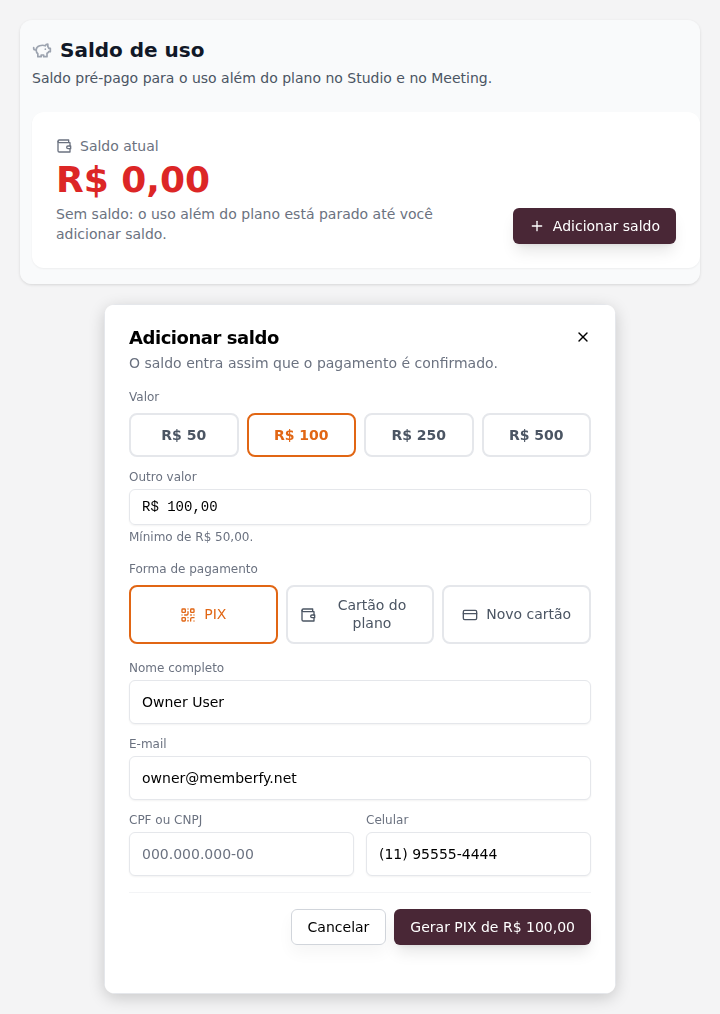
- In Settings › Plan and payments › Usage balance, click Add balance.
- Choose the Amount: R$ 50, R$ 100, R$ 250, R$ 500 or Other amount. The minimum is R$ 50 and the maximum R$ 10,000 per top-up.
- Choose the Payment method:
- PIX: fill in Full name, E-mail, CPF or CNPJ and Mobile phone and click Create R$ … PIX. The code and the QR code show up in the window, which follows the payment on its own;
- Plan card: "Charged to the saved card of the community's Memberfy plan.";
- New card: type the card. When the community's profile doesn't have a complete address, the window asks for the Card billing address.
- Confirm with Pay R$ … (by card).
The balance only comes in once the payment is confirmed. Card approved right away: "Payment confirmed: R$ 100.00 added to the balance." PIX, or a card under review: the top-up stays Awaiting payment at the top of the page and comes in once the payment is confirmed. Once confirmed, the receipt goes by e-mail and bell to the owner and finance, and stays under Top-ups (Receipt, with Print).
Card declined: the top-up is Declined and nothing comes into the balance; try another card or PIX.
Automatic top-up and notice
The Automatic top-up and notice card is there "So the balance doesn't run out in the middle of a pay-as-you-go use."
- Automatic top-up (off by default): on, when the balance drops below When the balance drops below, Memberfy charges the Add amount (minimum R$ 50) to the plan's saved card. It's one charge each time the balance crosses the limit, never in a row.
- Declined: if the card is declined, the automatic top-up stops, and the owner and finance are notified by e-mail and bell. The page shows "The automatic top-up was declined on … and is stopped."; check the plan's card and click Turn automatic top-up back on (or save again). A paid top-up also turns it back on.
- Notify when the balance drops below (default R$ 20): the owner and finance get an e-mail and a bell notice, once each time the balance crosses the amount.
Click Save to keep it.
Statement and top-ups
- Statement: "Everything that came in and went out of the balance, with the balance after each line." Each line has the type (Top-up, Usage, Top-up reversal, Memberfy adjustment), what was used (Protected video), the date and the amount. Filter by Month and Type and download with Export CSV (the
usage-balance-statementfile). No line is changed or deleted: the statement only gets new lines. - Top-ups: each top-up with the amount, the method (PIX or Card), whether it was Manual or Automatic, the date and the status (Awaiting payment, Paid, Declined, Reversed), with the Receipt.
Validity, reversal and top-up taken back
- The balance doesn't expire. It stays available until it's used.
- Reversals only through Memberfy. To reverse a top-up, contact Memberfy support. The reversal shows up in the statement as Top-up reversal.
- Top-up taken back: when a paid top-up is refunded or disputed at the bank, its amount comes out of the usage balance (Reversal: top-up refunded or Reversal: top-up disputed at the bank). The balance never goes negative: if part of the top-up was already used, what is missing becomes an amount owed.
- With an amount owed, the usage balance is paused: usage from the balance and the automatic top-up stop, and the page says how much to add to settle it. The next top-up pays the amount owed first (Settlement of the amount owed) and frees the usage balance. The owner and finance get the notice by e-mail and bell.
- A credit or correction by Memberfy shows up as Memberfy adjustment, with the reason.
When the community is deleted
When the owner deletes the community (see Community), the usage balance is closed and what came from top-ups and was not used goes back, as clause 10.12 of the terms of use says:
- First, the amount owed. If the community owed Memberfy an amount, the balance pays it (Settlement of the amount owed).
- Then, the top-up refunds. What is left goes back to each top-up's own payment method, to the same payer: a PIX top-up goes back by PIX; a card top-up, to the card. It starts with the most recent top-up, and no top-up gives back more than its own amount. In the statement, each part shows as Balance refund: community deleted.
- The balance stops. Use through the balance and the automatic top-up stop, and nothing else leaves the balance.
| Goes back | Does not go back |
|---|---|
| The unused balance of paid top-ups, to each one's payment method | Credits given by Memberfy (Memberfy adjustment): they count as used last and never become money |
| What paid the amount owed |
Example: a R$ 100 top-up, R$ 60 used and a R$ 30 credit from Memberfy. The balance is R$ 70; R$ 40 go back to the top-up's payment method, and the R$ 30 credit stays.
- Notice: the owner and finance receive the e-mail "Usage balance refunded", with the amount that goes back. The refund can take a few days to show on the card statement or in the PIX account.
- Refund declined: if the payment method definitively refuses a top-up's refund (for example, because the card's refund window has passed), the amount goes back to the deleted community's balance (Refund declined by the payment method: amount back in the balance) and stays recorded; the Memberfy team is told and handles the case. A momentary communication failure is not a refusal: Memberfy tries again on its own, with the same request, never refunding twice.
- Through the API: the owner deletes the community with
DELETE /api/communities/{id}, and the response carries the result indata.usageBalanceRefund. Before deleting,GET /api/walletshows inclosureRefundhow much would go back. See the API reference. - Suspension and ban are not a closure: while suspended, the balance stays recorded; when banned for breaching the terms, the unused balance is not refunded, to the extent permitted by law (clause 10.10).
Through the assistant (MCP)
The assistant checks the balance, the statement and the top-ups, adds balance by PIX or with the plan card and changes the automatic top-up and the notice. Adding balance and turning on or changing the automatic top-up ask for your yes first. A new card is always through the app. See [Usage balance in the Finance tools](/mcp/ferramentas-financeiro#usage balance).