
Groups and org chart
Groups split the community into classes, teams and departments; they can nest inside each other, have a leader, be everyone's default group and open spaces. The org chart shows who reports to whom.
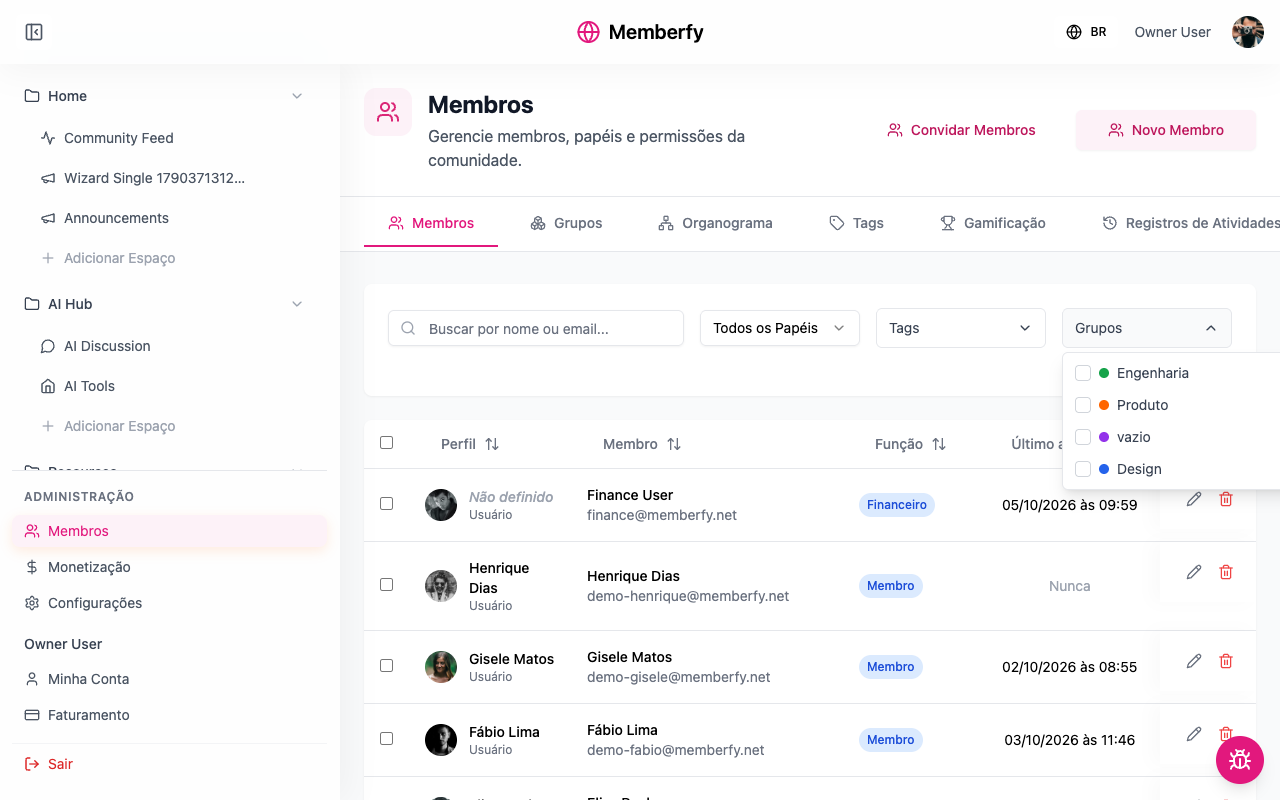
Groups split the community: a class, a department, a squad, the board. Unlike tags, a group grants access: a private space can be opened to a single group. The org chart is a separate but related thing: who reports to whom.
What they're for
| Community | Groups | What for |
|---|---|---|
| Online school | March class, April class | Each class's room, opened to the group |
| Company (HR) | Engineering, Product › Design, Board | Spaces per department; the company's org chart |
| Coworking space | Residents, House team | The residents' board; the team's space |
| Association | Board, Council | The board's room |
How it works
The group
| Field | What for |
|---|---|
| Name | E.g. Class of 2026, Marketing, Wednesday mentoring |
| Inside | The parent group, if any (Design inside Product) |
| Color | How the group is shown |
| Led by | The group's leader |
| Default group for the community | "Everyone joins this group — the people already here and whoever signs up later. Unticking it removes nobody." |
| Who is in this group | The people |
A person can be in several groups. The group marked with a star is their main one: it's the one shown in their box on the org chart.
Valid until
Each of a person's groups can have an end date: in Valid until, a date, and the person stays in the group until the end of that day, in the community's time zone. No end date (the default) keeps the person in the group for good.
- When it ends, the person leaves the group by themselves, within 10 minutes after midnight, and loses the access the group gave (the spaces and sections opened to it). If it was their main group, another of their groups becomes the main one.
- The person is not told: no e-mail and no bell notice. The exit goes to the Logs ("left the group … (validity ended)"), fires the leave-group workflow trigger and the
member.group_leftwebhook, withreason: "expired". - Where it shows: in the Members list, next to the group (until 12/31/2026), and in Who is in this group, next to each person, for the owner and the admin.
- Other ways to set the end date: on the group screen, in Who is in this group (see the steps below); in the member import, the Groups: valid until column; in a workflow, the add-to-group step, with No end date, For N days or Until a date.
- Changing a person's groups does not erase the end date of the groups they stay in. Taking the person out of the group and putting them back without a date leaves them with no end date.
It works for classes that end, temporary access and an event's guests: "March class, valid until 06/30".
A group grants access
In a space or section with Private visibility, add the group under Who gets in › Groups. People in the group get in; people outside see the space with a padlock (Granted by the team), without the content, or don't see it at all if the area is set to Hide under For those without access. See Visibility and access.
The org chart
Each person can have a leader (Reports to). With that, Members › Org chart draws the structure: as a List (indented tree) or as a Chart (with zoom and drag), and you can view it starting from a person or from a group.
- People without a leader sit at the top.
- People with neither a leader nor reports appear in a "no place yet" list, instead of becoming a loose box.
- When a leader leaves the community, the people who reported to them now report to that leader's own leader.
- The direct leader has an HR role: they approve the person's development plan and receive feedback about them. Beyond that, being a leader grants no permission: what each person can do in the community comes from their role.
- The org chart is per community.
Who can
| What | Who |
|---|---|
| Create, edit and delete groups | The owner, admins, moderators and finance |
| Put people in and take them out of groups and set the Valid until | Only the owner and admins |
| Set the leader (Reports to), in the detail or by dragging in the org chart | Only the owner and admins, and nobody sets their own leader: an owner's or admin's leader is set by another owner or admin |
Since a group can open spaces, changing a person's groups belongs to the owner and the admins: moderators and finance see the groups without being able to change them ("Only owner and admin change a person's groups: a group can open spaces."), also in Who is in this group and when dragging in the org chart.
Because the direct leader approves the development plan and reads feedback about the person, changing who reports to whom belongs to the owner and the admins. Moderators and finance see the leader without being able to change it ("Only owner and admin set who a person reports to.") and, in the org chart by leadership, can't drag people.
Step by step
Create a group
Role: owner, admin, moderator or finance.
- Administration › Members › Groups › New group.
- Name, Inside (optional), Color and Led by (optional).
- Tick Default group for the community only if everyone should be in it.
- Save. People are added afterwards, once the group exists (below).
Add people to a group, with or without an end date
Role: owner or admin.
- In Groups, open the group (Edit group). Who is in this group shows on a group that already exists.
- If it's for a while, fill in Valid until, under the search ("Optional. Whoever you add leaves the group by themselves at the end of that day."); the community time zone shows below it. The date applies to everyone you add next, until you clear the field with No end date.
- Search for people and add them. Each one is added right away and shows until mm/dd/yyyy, or no date.
- To change someone's date, click their until mm/dd/yyyy (or the calendar icon for someone with no end date), pick the date and Save. Remove end date leaves the person with no end date. A date in the past gives "The validity must be a future date."
Adding, removing and changing the end date take effect right away, without saving the group. When the date arrives, the person leaves the group by themselves.
Put a person in a group and set their leader
Role: owner or admin.
- In Members, open the person's Place in the organization ("Who Ana reports to, and which groups they are in.").
- In Reports to, search for the leader (empty = at the top).
- In Groups, tick the groups and choose the main one (the star).
- If it's for a while, fill in Valid until on the group; No end date removes the date.
- Save.
Open a space to the group
Role: owner or admin.
- Space options › Edit space.
- Visibility = Private; under Who gets in, + Groups.
- Save.
Examples
A room for each class. Group March class with the 30 students; space March room (Feed, Private, group March class). Each class sees only its own room.
A company's org chart. Groups Engineering, Product and Design (inside Product). Everyone has their leader set. In Org chart › Chart, you see the whole structure; click the head of product's name to see only her area.
Everyone in one group, for filtering. A Community group set as default: everyone already here and everyone who arrives joins it.
Common errors and how to fix them
| Situation | What to do |
|---|---|
| "A group with this name already exists in this community" | Another live group uses the name: choose another. A deleted group's name can be used again |
| No groups yet. | Create the first one in Groups |
| The org chart says "Nobody has a leader yet." | Set Reports to on a few people |
| "Too many people to draw at once." | Open it by group, or click a name to start from that person |
| "Only owner and admin set who a person reports to." | You are a moderator or finance: ask the owner or an admin |
| "Nobody sets their own leader: ask another owner or admin" | You tried to set your own Reports to: ask another owner or admin |
| The person can't see the group's space | They aren't in the group, or the space's section is more restricted |
| You can't make someone the leader of their own leader | The org chart doesn't allow cycles |
Frequently asked questions
Does deleting a group remove people from the community? No. They just stop being in that group, and lose the access that came from it.
Does unticking the default group remove people? No. It only stops adding people who arrive later.
Does a leader see what their reports do? No, with two HR exceptions: the direct leader approves and follows the person's development plan (the indirect leader only reads it) and reads feedback about them. Beyond that, being a leader grants no permission.
In the API
GET/POST/PUT/DELETE /api/member-groups, PUT /api/hierarchy/members/{id} (leader and groups; reportsToId only by the owner and admins, everyone else gets 403), GET /api/hierarchy/org-chart and GET /api/hierarchy/me, which says whether the caller leads anyone (isLeader), who reports directly to them (directReports) and whether they have indirect reports (hasIndirectReports); with spaceId, directReports brings only those who open that space. Nobody sets their own reportsToId (403, even the owner). A person's groups (groupIds) and end dates (groupExpirations: { "<groupId>": "YYYY-MM-DD" | null }, valid until the end of the day in the community's time zone) belong only to the owner and the admins (everyone else gets 403); a past date returns 400 with code: past, and a group the person is not in, notInGroup. Without groupExpirations, the end dates stay as they were. The response and GET /api/members?fields=groups (owner and admin) return groups[].expiresAt. See Hierarchy.