
Refunds and disputes
How to refund a buyer from the Sales tab, choosing whether access continues; what happens on card, PIX and boleto, without balance and when the provider declines; how much leaves the balance (the platform fee goes back in proportion and the community only returns its own part); and the dispute (chargeback), in which the community returns everything.
Refunds are made by the community itself, in the Sales tab: you pick the purchase, say whether access continues and Memberfy gives the money back to the buyer. On card and PIX, the platform fee goes back along with it, and the community only returns the part it received.
A dispute (a chargeback), when the cardholder disputes the purchase directly with the bank, follows a different rule: the community returns everything the cardholder paid, installment interest included, the platform fee is not returned, and there is the chargeback fee of US$ 20.00 (R$ 15.00 in reais).
What it's for
- Giving a buyer's money back without depending on anyone.
- Deciding, right then, whether the person refunded keeps access (a discount agreed after the purchase) or loses it (a cancellation).
- Knowing how much leaves the balance when a sale is returned, and checking a Refund or Chargeback line in the statement.
How it works
Who can refund
Owner, admin and finance. Moderators and members don't see the button. See Roles and permissions.
How to refund
The Refund button is in two places:
- Monetization › Sales, on the purchase's row. See Sales.
- Members › Subscriptions › View details › Charge history, next to a paid charge of the subscription.
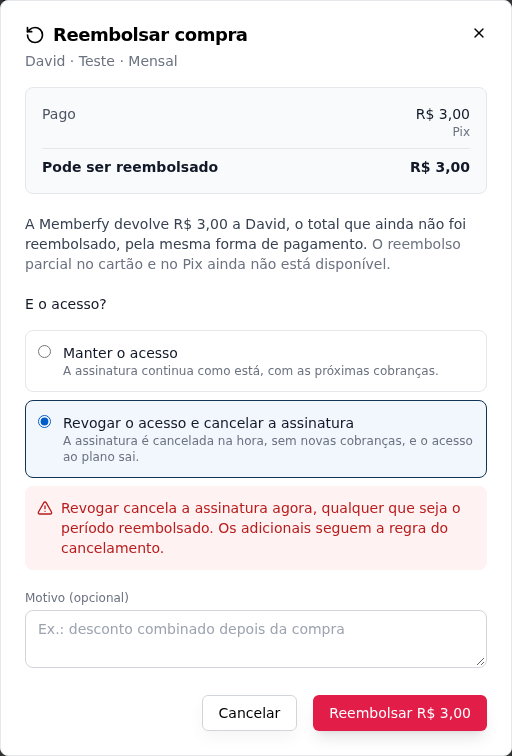
The Refund purchase dialog shows what was Paid, what was Already refunded and what Can be refunded, and asks for:
- What about access? Keep access (the default) or Revoke access.
- Amount to refund: on card and PIX, from US$ 0.01 up to what can still be refunded. The Refund all (US$ …) shortcut fills in the whole amount left.
- Reason (optional): for example, a discount agreed after the purchase.
- The Refund US$ … button confirms.
Clicking twice doesn't refund twice: the same request is sent again, without duplicating.
After you confirm, the dialog shows the result: Refund completed ("US$ 97.00 returned to Maria. The buyer gets an email."), Processing, Pending: waiting for balance or Refund declined.
Access: keep or revoke
| Choice | One-time product or add-on | Subscription |
|---|---|---|
| Keep access | The buyer keeps access to the product | The subscription stays as it is, with its next charges |
| Revoke access | The buyer loses access to the product | Revoke access and cancel the subscription: the subscription is canceled right away, with no new charges, and access to the plan ends |
On a subscription, revoking cancels the subscription now, whatever period is refunded. The dialog warns you about this before you confirm. Add-ons follow the cancellation rule.
Even with access kept, the purchase shows as Refunded, with the amount and the date, in the Sales tab and in the buyer's history.
The buyer gets the email "Refund of … for …", with the amount and the Access line (Your access continues or Your access was removed). The community gets the notice "Refund issued".
Stock and refunds
On a product with Control Stock?:
- Revoke access returns the unit to stock, only once: it's for sale again.
- Keep access, and a partial refund that keeps access, don't return the unit: the buyer still has the product.
- A chargeback doesn't return the unit either.
See Products.
The refund history
Every refund of a sale lives in the sale detail: in the Sales tab, click the sale and look at the Timeline, with who asked, how much, the reason, the access chosen, each step (processing, waiting for balance, under review by Memberfy) and the result, with how much left the community's balance and how much platform fee came back. See Sales.
Card and PIX: the full amount or part of it
On card and PIX, Memberfy gives the money back to the buyer through the same payment method. You can return the full amount or only part of it: from US$ 0.01 up to what can still be refunded. A purchase can have several partial refunds, until it reaches the total.
In an order with several purchases (a plan and its add-ons paid together), each purchase is refunded on its own: you can return just an add-on, for example, without touching the plan.
A partial refund usually stays Processing for a while: the refund was requested and is being confirmed, which usually takes a few minutes. The status updates on its own in the Sales tab.
Boleto: the community returns it directly
A paid boleto isn't given back by the payment provider. So, when you click Refund on a purchase paid by boleto, the dialog explains: "This purchase was paid by boleto, and Memberfy can't give a paid boleto back. Contact the buyer and return the money directly, by PIX or bank transfer. Then record it here."
After returning it:
- Check I already returned it to the buyer.
- Fill in Amount returned (it can be just part of it), Date returned and, if you want, Note (optional) (PIX sent to the buyer's key).
- Choose to keep or revoke access.
- Click Record return of US$ ….
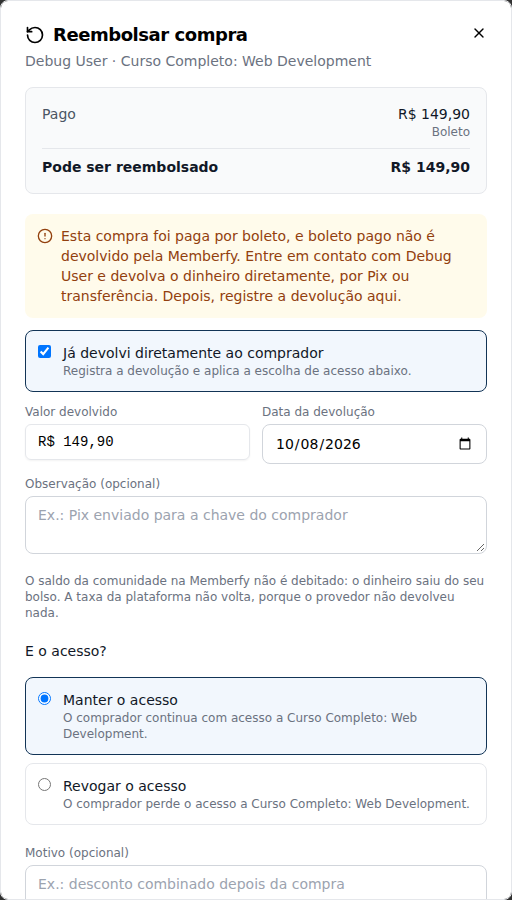
Nothing leaves the community's balance at Memberfy: the money came out of your own pocket, and debiting the balance would charge the return twice. The platform fee isn't returned, because the payment provider returned nothing. The statement records the return as information, with no amount, and the sale shows as Returned directly.
No balance: the refund stays pending
On card and PIX, the community's part comes out of its receiving account. If that account doesn't have the balance for the community's part yet, the refund stays Pending: waiting for balance:
- the access choice applies right away: if you revoked, access ends now;
- the refund goes out on its own when balance comes in (a new sale or a sale that was released), in order of arrival: the oldest refund goes first. Memberfy checks every 10 minutes;
- the buyer gets the email when the refund goes out;
- the amount is reserved: it doesn't go into payouts. The payout dialog shows "US$ … reserved for refunds waiting for balance: not available for payout." See Payouts.
On card and PIX, the refund is always made by Memberfy: there's no "mark as returned outside". Returning the money directly is only for boleto.
When the provider declines
If the payment provider declines the refund, the dialog shows Refund declined, with the reason, and "Nothing changed in the balance or in access." The Try again button makes a new request. In the Sales tab, the purchase gets the status Refund declined and the reason.
Refund made outside Memberfy
A refund made directly at the payment provider, outside Memberfy's screen, keeps access, full or partial: the purchase stays active, the refund goes into the statement and shows on the sale as made in the provider's dashboard. To revoke access, the way is the refund from the Sales tab.
A paid boleto canceled directly at the provider goes to Under review by Memberfy: Memberfy reviews it and completes or declines the refund.
Purchase with no charge at the provider
A purchase with no charge at the payment provider isn't refunded through Memberfy. In the Sales tab, the row shows the explanation instead of the button: "This purchase has no charge at the payment provider to refund." For that one, contact support.
How much leaves the balance
On card and PIX, the refund returns to the buyer the amount they paid. The platform fee (6.99% + US$ 1.00 per sale) goes back along with it, in proportion to the amount refunded, and the community only returns its own part from the sale, in a Refund line of the statement.
That's why a refund's debit equals the credit the sale left in the balance, whichever option Who Pays the Fees? has:
| Who pays the fee | The buyer paid | The sale credited | The buyer gets back | A full refund debits |
|---|---|---|---|---|
| Buyer | The price + the fee | The price | The price + the fee | The price |
| Organization | The price | The price − the fee | The price | The price − the fee |
In both cases, the balance goes back to what it was before the sale.
On a boleto returned directly, nothing leaves the balance and the fee doesn't come back (see Boleto).
Dispute (chargeback)
In a dispute, the cardholder's bank gives them back the amount of the purchase, and that amount comes out of the community's balance, in a Chargeback line. The community gets the notice "Chargeback opened: …". On a sale in card installments, the cardholder disputes what they paid, installment interest included, so the community returns everything, interest included, even though the interest never went into its balance. In a dispute, the platform fee is not returned.
Each dispute also carries the chargeback fee, US$ 20.00 (R$ 15.00 in reais), on its own line (Chargeback fee) inside the dispute.
Where the money comes from
Every sale becomes available for payout 30 days after payment (on a card sale in installments, each installment on its own date). So:
- Before the release, the refund or chargeback comes out of that sale's Pending amount. Available doesn't change, and nothing is owed.
- After the release, it comes out of Available for Payout.
- If it goes past what is available (the money was already paid out, for example), available goes below zero and the dashboard shows the Amount owed, taken from the next sales to be released.
On every sale, 4% of the gross amount is held for 60 days (the chargeback reserve), with every payment method. Holding the money is what guarantees there is balance to refund: until the sale is released, its money is still in the community. In a refund or a chargeback, the share of the reserve matching the amount returned is no longer held. See Balance and statement.
Step by step: refund while keeping access
Role: owner, admin or finance.
- Open Monetization › Sales and search for the buyer by name or email.
- On the purchase's row, click Refund.
- Check the amount under Can be refunded.
- Under What about access?, leave Keep access.
- Write the reason, if you want, and click Refund US$ ….
- Refund completed shows up. The buyer gets the email, and the sale now shows Refunded, with Access kept.
Examples with numbers
What leaves the balance in a refund. A PIX sale of US$ 100.00, with the fee paid by the buyer:
- the fee is US$ 6.99 (6.99%) + US$ 1.00 = US$ 7.99;
- the buyer pays US$ 100.00 + US$ 7.99 = US$ 107.99;
- the sale credits US$ 100.00 to the community's balance;
- a full refund returns US$ 107.99 to the buyer: the US$ 100.00 come out of the community's balance, and the US$ 7.99 of fee are returned by Memberfy.
In the end, the community's balance is the same as before the sale.
The same sale, with the fee paid by the organization. The buyer pays US$ 100.00; the sale credits US$ 100.00 − US$ 7.99 = US$ 92.01. A full refund returns the US$ 100.00 to the buyer: US$ 92.01 come out of the balance, and the US$ 7.99 of fee come back with it. Again, the balance is the same as before the sale.
The same sale, paid by boleto. The sale credits US$ 92.01. The community returns the US$ 100.00 to the buyer by PIX, out of its own pocket, and records I already returned it to the buyer. Nothing leaves the balance: the US$ 92.01 stay there. The US$ 7.99 fee doesn't come back, so the returned sale cost the community US$ 7.99.
A partial refund. From the same US$ 100.00 PIX sale, the community returns only US$ 30.00, a discount agreed after the purchase. The platform fee goes back in the same proportion, and only the community's part of those US$ 30.00 leaves the balance. The refund stays Processing for a few minutes while it is confirmed, and the purchase keeps the Refund button for what is left.
Just one add-on of an order. Ana subscribed to the plan with an add-on, paid together by card. The community refunds only the add-on: the plan stays as it is.
A discount after the purchase, on a subscription. Bruno pays the US$ 25.00 monthly fee by PIX and the community agrees to give the month back. It refunds the charge with Keep access: the money goes back, and the subscription carries on with its next charges. Had it chosen to revoke, the subscription would have been canceled right away.
No balance in the receiving account. The community refunds a PIX sale of US$ 100.00, whose community part is US$ 92.01, but the receiving account only has US$ 40.00. The refund stays Pending: waiting for balance, and the payout dialog shows "US$ 92.01 reserved for refunds waiting for balance". The next day a sale comes in; once the account has the US$ 92.01, the refund goes out on its own and the buyer gets the email.
A refund before the release. A US$ 100 PIX sale, paid on March 10, credits US$ 92.01: US$ 88.01 to Pending, released on April 9, and US$ 4.00 of reserve, held until May 9. A full refund on March 15 takes the US$ 92.01 out of that sale: its pending amount goes to zero, the reserve is no longer held, and available doesn't change.
A refund after the payout. The same sale was released on April 9 and the US$ 88.01 was paid out. In the refund on April 20, the US$ 4.00 reserve goes back to available and the US$ 92.01 comes out: available goes to − US$ 88.01, and the dashboard shows Amount owed: US$ 88.01, taken from the next sales to be released.
Common errors and how to fix them
| What happens | Why | What to do |
|---|---|---|
| Processing | The refund was requested and is being confirmed; it usually takes a few minutes, and it's common on a partial refund | Nothing to do: the status updates on its own |
| The amount is above what is left to refund (…). | The amount is higher than what is left to refund | Use the amount under Can be refunded |
| Memberfy cannot give back a paid boleto… | The purchase was paid by boleto | Return it directly to the buyer and check I already returned it to the buyer |
| This purchase cannot be refunded (status: …). | The purchase is pending or disputed | Wait for the payment to be confirmed or the dispute to end |
| This purchase has nothing left to refund. | The purchase was already fully refunded | Open the sale and see the history in the Timeline |
| Refund declined, with the reason | The payment provider didn't make the refund | Nothing changed; click Try again |
| Pending: waiting for balance | The receiving account doesn't have the balance for the community's part yet | Nothing to do: the refund goes out on its own when balance comes in |
| The buyer got back more than the Refund line took from the balance | The platform fee is returned along with it, and the community only returns what it received | That's expected: the Refund line equals the Sale it returns |
| A dispute took US$ 20.00 more | It is the chargeback fee | That's expected: it shows on its own line inside the dispute |
| The available balance dropped without a payout | A refund or a dispute of a sale already released went into the statement | See Latest Transactions |
| Available went below zero | The refund or the dispute went past what was available | The Amount owed is taken from the next sales to be released |
Frequently asked questions
Does the buyer lose access when I refund? Only if you choose Revoke access. The default is to keep it.
Does revoking on a subscription cancel the subscription? Yes, right away, with no new charges, whatever period is refunded.
Can I return just part of it? Yes. On card and PIX, type how much to return under Amount to refund, from US$ 0.01 up to what is left; the platform fee goes back in the same proportion. On boleto, record the amount you returned.
Does Memberfy return the platform fee in a refund? On card and PIX, yes, in proportion to the amount refunded, and the community only returns the part it received. On a boleto returned directly, no: the payment provider returned nothing, and nothing leaves your balance.
What if the buyer paid the fee? The buyer gets back everything they paid, fee included. Only the price comes out of the community's balance, which is what the sale credited.
What if the community has no balance? The refund stays pending and goes out on its own when balance comes in, in order of arrival. Meanwhile, the amount is reserved and not available for payout.
And in a dispute? The community returns everything the cardholder paid, installment interest included; the platform fee is not returned, and there is the chargeback fee of US$ 20.00 (R$ 15.00 in reais).
If the sale hasn't been released yet, does the refund come out of my available balance? No. Before the release, it comes out of that sale's Pending amount.
How do I avoid disputes? Use clear product names (that's what shows on the card statement) and answer refund requests quickly: an agreed refund is better than a dispute at the bank.
In the API
POST /api/manage/purchases/{purchaseId}/refunds, with access (KEEP or REVOKE), idempotencyKey, reason and, on boleto only, settledOutside. See Responses and errors.
Through the assistant
refund_purchase refunds after your yes to a summary, and the Refund a buyer prompt guides the conversation. See Recipes.