
Checkout
How a member picks a plan and pays inside the community, by PIX, boleto or card. The details it asks for, installments and interest, coupons, add-ons, the order page, the confirmation and the message for each situation.
The checkout is buying inside your community: the member chooses, pays and gets in, with no link to another company and without leaving your address. The same screen sells plans (subscriptions), with their add-ons, and one-off products.
What it's for
| Community | What the member buys at checkout |
|---|---|
| SaaS | The Growth plan, yearly, in up to 12 installments on the card, with the Coworking extension |
| Online school | The Student plan, monthly, by PIX, with the coupon LANCAMENTO20 |
| Coworking | The Resident plan with a 12-month contract, by card |
| Event | The ticket, by boleto |
Where it lives
| Address | What it shows |
|---|---|
/pricing | The Subscriptions page: the community's plans to compare and choose (see below) |
/pricing/<plan> | The plan already selected, to share directly |
/products | The catalog of one-off products with a direct link. Clicking a product opens its details, with Buy and Copy link |
/products?product=<slug> | The catalog with the product already selected, to share |
How it works
The Subscriptions page
/pricing is the Subscriptions page (the same name on the browser tab), with the text "Choose how you want to be part of the community. Start with the plan that makes sense now and switch whenever you like." Below it, the Monthly | Yearly toggle, when the plans bill at both rhythms, with the yearly savings tag ("−17%", or "up to −20%" when the plans save differently); the page opens on the cheaper option.
The plans show up on the same cards as the Store: the Recommended badge (the option with Feature in the store), the price at the toggle's rhythm, the savings tag, Renews automatically or the contract term, the benefits, the Subscribe to {plan} button and, below it, "Unlocked right after payment is confirmed." The cards' rows line up with each other. A Link only plan never shows up.
The layout depends on how many plans there are:
| Plans | How they show |
|---|---|
| 1 | The card on the right and, on the left, what the plan unlocks (the spaces it opens) or the How the subscription works block |
| 2 or 3 | Side by side, across the full width, with the How the subscription works strip below |
| 4 or more | Three cards, the strip and the All subscriptions list |
With 4 plans or more, the three cards are picked by price per month at the toggle's rhythm, from cheapest to most expensive: the cheapest, the median and the most expensive. A recommended plan always takes the median's place (if it is already the cheapest or the most expensive, the middle place goes to the median of the others); with two or three recommended, they all go in. The page never scrolls sideways.
Below, All subscriptions lists every plan (the ones on the cards too), from cheapest to most expensive. Each whole row is a link and shows the name, the first line of the description, Unlocks N spaces, + N add-ons available, the price per month, the savings tag and, on yearly, "R$ 1,188.00 billed yearly".
How the subscription works explains it in three items: Ongoing access ("Everything the plan includes, while the subscription is active."), Renews automatically ("You are billed each period, with nothing to do on your side.") and Instant access ("Unlocked right after payment is confirmed.").
Someone who already subscribes sees their own plan with the Your plan badge (on the card and on the list row, which isn't clickable), and the button on the others becomes Switch to {plan}: instead of the checkout, it opens the plan change, already on the chosen plan and billing.
The buyer's path
- Picks the plan at
/pricing(see The Subscriptions page). - Picks the billing option under Choose a billing option. When there are monthly and yearly options, a Monthly | Yearly toggle appears, with the yearly savings tag.
- Checks the add-ons, if the plan has any, under Add-ons for this plan ("Billed with the plan, in the same payment and on the same date.").
- Pays under Payment Details:
- Payment method: PIX, card or boleto, among the ones the option accepts;
- Your details: Full name, E-mail, CPF or CNPJ and Mobile phone;
- on the card: card number, name on card, expiry date, CVV and Installments;
- I have a coupon, if they have one;
- the summary, with each item and the Total;
- Subscribe (or Buy, for a product).
- Follows the payment on the order page,
/_/checkout/payment/<id>, which shows the PIX or boleto code and confirms on its own when the payment comes in.
Someone who is not signed in sees "You need an account in this community to pay." and signs in or creates the account along the way.
The yearly price and the savings tag
On the checkout of a yearly option, the price box has three lines:
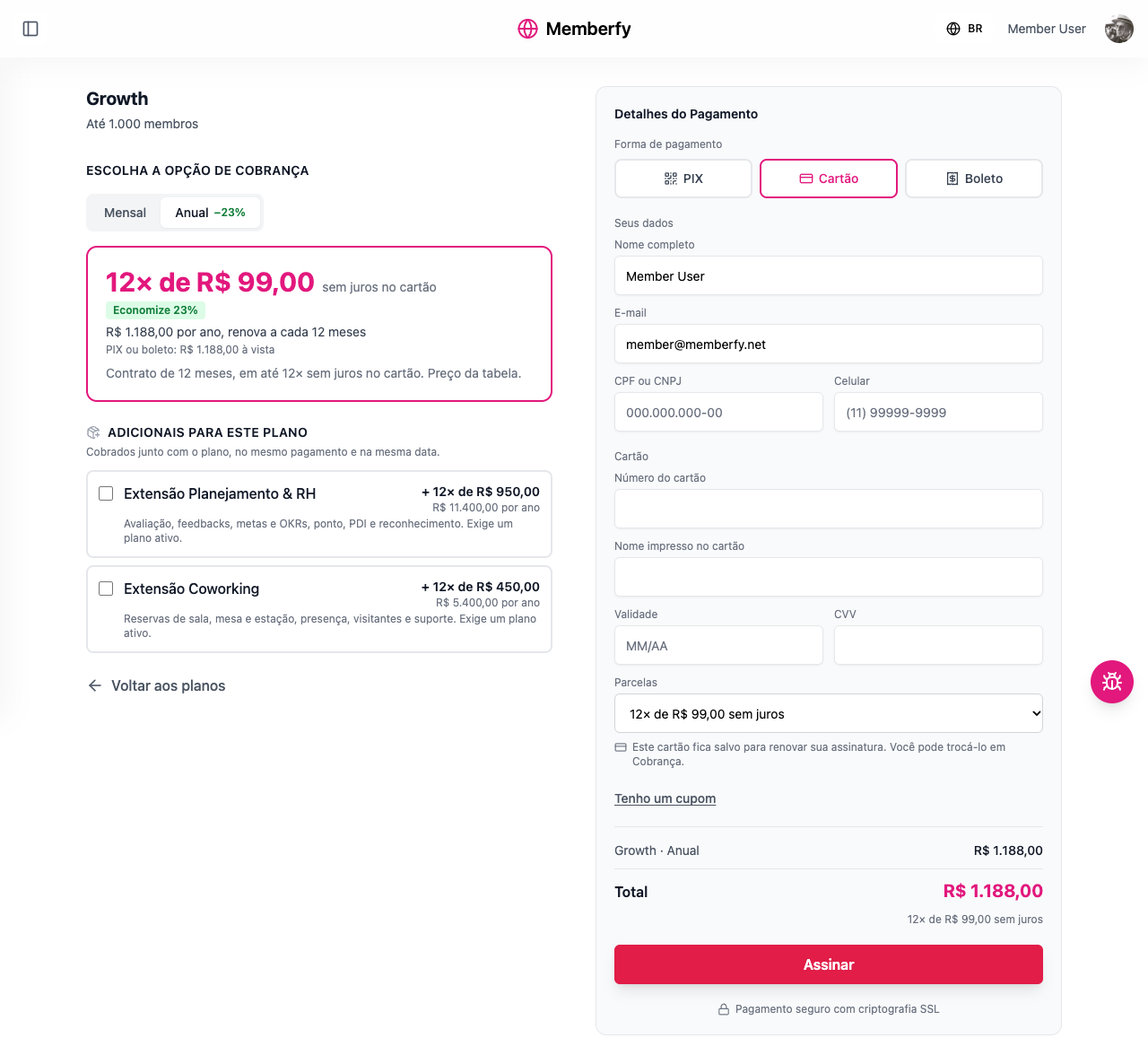
- the card: "12× R$ 99.00", with "interest-free on your card" or "on your card (total R$ 1,290.00)" when the buyer pays the interest (without installments, the year's price);
- the savings tag, with the up-front amount when the saving is only off the card ("Save 23% with PIX or boleto: R$ 1,188.00 up front"; with an interest-free card, just "Save 23%"); with no tag, just the up-front amount ("PIX or boleto: R$ 1,188.00 up front");
- a terms line: "12-month contract, renews automatically."
The savings tag
The tag compares the option with the monthly plan without a contract and says where the saving happens, so it never promises on the card what only PIX delivers:
| The option | The tag |
|---|---|
| No card installments, or installments interest-free for the buyer | "Save 23%" |
| Installments with interest paid by the buyer, and it accepts PIX and boleto | "Save 23% with PIX or boleto" |
| Only PIX (besides the card) | "Save 23% with PIX" |
| Only boleto (besides the card) | "Save 23% with boleto" |
| Card only, and paying in full on the card (1×) has no surcharge | "Save 23% paying in full by card" |
| Card only, with no way to pay the price up front | No tag |
How the percentage is calculated. Each option's price per month is compared with the plan's monthly option without a contract: a yearly price of 1,188 is 99 a month, against 129 for the monthly, so the tag says 23%. What counts is the price the buyer pays: when the option has Who Pays the Fees? = Buyer, the platform fee is included on both sides of the comparison. The result is rounded to the nearest whole number. The monthly option itself has no tag, and there is no tag when the option is not cheaper than the monthly one or when the plan has no monthly option without a contract to compare with.
The rule is the same in the checkout, on the Subscriptions page, in the Store and on the padlocked space screen. See Installment interest.
By payment method
| Method | What the buyer sees | When access is unlocked |
|---|---|---|
| PIX | "Pay with PIX": the QR code and the copy-and-paste code, with a countdown ("This PIX is valid for … more"). The code is valid for 30 minutes | As soon as the PIX is paid; the page updates on its own |
| Boleto | "Pay the boleto": the link and the barcode, with the notice "Once the boleto clears, your access is unlocked. It can take up to 3 business days." | When the boleto clears |
| Card | The answer right away: "Payment confirmed", or "Payment not approved", and the buyer stays at checkout to try another method | On approval |
The order page
Every order (PIX, boleto or card) gets a page of its own, /_/checkout/payment/<id>. It exists so the buyer doesn't lose the payment: they can reload, go to the bank app and come back, or open it again later, and the PIX or boleto is still there.
| State | What the page shows |
|---|---|
| Waiting for payment | The PIX or the boleto, and "We are following your payment." The page checks the payment by itself every few seconds |
| PIX expired | "The time to pay this PIX is over and nothing was charged.", with Generate a new PIX |
| Payment not approved | "Nothing was charged. You can try again with another payment method.", with Try again |
| Payment confirmed | The confirmation (see below) |
The page only opens for the person who placed the order, signed in to the community: "Sign in to follow your payment."
If the payment processor's confirmation is late, Memberfy goes and fetches the result itself: the order page asks while it is open, and the platform checks open orders up to 7 days old every few minutes. A paid PIX doesn't get stuck as "waiting".
The PIX and the boleto also arrive by email, to pay later. See Payment emails.
Stock
A one-off product with Control Stock? only sells while there are units left. Once they run out, the product shows as Sold out, and checkout refuses it.
Checkout takes the unit when the order is placed, not on payment:
- With no unit left, the order is refused with "Sold out" (error
409), without generating a PIX, a boleto or a charge. Two buyers on the last unit: one buys, the other sees "Sold out". - The unit stays reserved while the order is open. A boleto holds the unit until it's due. Someone who already has an open PIX or boleto for the product gets that same payment back, instead of reserving another unit.
- It comes back when the payment fails, when the PIX or the boleto expires, and when a refund removes access. A partial refund that keeps access and a chargeback don't return the unit.
- Sold out also shows in the direct-link catalog,
/products.
Free product and physical product
- Free product (price zero): there's no payment method, card details, CPF or CNPJ, and no fee. The person must be signed in and clicks Get it free; access comes at once, with the confirmation e-mail. It works once per person and product: repeating it returns the purchase that already exists. There's a limit on attempts in a short time. When sold out, checkout refuses and offers the waitlist. The purchase shows in sales as Free, with no entry in the statement and no refund. See Free product.
- Physical product: before paying, checkout asks for the Delivery address ("This product is shipped to you. Fill in the delivery address."): country, postal code (in Brazil,
00000-000), recipient name, street, number, complement (optional), district, city, state and phone. The address stays on the purchase; only the buyer and the team read it. Memberfy doesn't calculate shipping or track the delivery. - Reserved seat: whoever accepts the waitlist offer opens the same checkout (or the free checkout) with the seat already reserved.
Installments
- One-off product: up to 12 installments on the card, up to the maximum set on the product.
- Monthly plan: one charge a month, no installments.
- Annual in installments: the year in up to 12 installments on the card; PIX and boleto pay upfront.
- The card used for a subscription is saved for renewal: "This card is saved to renew your subscription. You can change it under Billing."
Installment interest
Splitting a card payment into 2 or more installments carries Memberfy's installment interest, a total percentage on the amount that depends on the number of installments:
| Installments | Interest (total on the amount) |
|---|---|
| 1× (upfront) | None |
| 2× to 6× | 4.29% |
| 7× to 12× | 6.00% |
Who pays it is chosen on each product, under Who pays the installment interest?:
- Buyer (the default): the interest is added to the price, and each installment is a little higher. The community receives the same as in an upfront sale.
- Organization: the buyer pays the price split into installments, with nothing added, and the interest comes out of what the community receives.
The platform fee is calculated on the amount without interest. PIX, boleto and a 1× card payment carry no interest. Details and examples in Annual in installments.
On the card, the installment selector shows each installment and the total: "12× R$ 104.94 (total R$ 1,259.28)". The summary gains the line Installment interest (6.00%). When the organization pays the interest, the selector shows "12× R$ 99.00, interest-free", because the buyer pays nothing extra.
The fee in the total
If the option has Who Pays the Fees? = Buyer, the summary shows a Platform fee line and it goes into the total. With Organization, the buyer pays the advertised price. See Platform fee.
Coupon
Under I have a coupon, the buyer types the code and clicks Apply: "Coupon LANCAMENTO20 applied · −US$ 5.00", with how long the discount lasts. The discount is applied before the fee. See Coupons.
A coupon that brings the total to zero (a one-off product, or a plan with a 100% forever coupon, no add-ons) replaces payment with Get it free: the purchase closes with no payment method, and the plan renewal charges nothing while the coupon covers it. On a plan, a 100% once or repeating coupon is refused ("This coupon only zeroes the plan's first months; use a card to subscribe"). See 100% coupon.
After payment
- Access to the plan's (or the product's) spaces is unlocked.
- The order page becomes the confirmation, Payment confirmed:
- "Your subscription is active." (or "Your purchase is complete.", for a product);
- the summary: Plan, Amount paid, Payment method, Date and Next charge;
- What it unlocked: the benefits and the spaces the purchase opens, including those of a section granted to the plan or product (spaces every member already opens are left out);
- the product's thank-you message, if there is one;
- the Last chance offer, if there is a downsell for an add-on they left out.
- If the product has a redirect address, the page takes the buyer there in 5 seconds ("Redirecting in 5 seconds…", with Go now). The countdown waits while an offer is on screen. Without a redirect, Go to the community and See billing remain.
- The buyer gets "Payment confirmed: …" by email; the community gets the New sale notice.
- The subscription shows up in the member's Billing, with the next charge.
- The sale goes into the community's statement.
Someone who already subscribes to the plan
The checkout doesn't sell the same plan twice to the same person. If they already have an active, trialing or past-due subscription to the plan, on any of its billing options, the payment is refused: "You already subscribe to this plan." To pay an overdue period, the way is Pay now, not a new purchase.
If they already have an open PIX or boleto for the plan, the checkout doesn't generate another one: "You already have an open payment for this plan. Pay the same PIX or boleto, or cancel it to choose another payment method." Before refusing, the platform checks the open payment with the payment processor: if it has been paid in the meantime, the subscription is activated; if it has expired, the checkout carries on as normal.
Buying another plan from the same community is still possible. Someone who already has a plan and picks another one on the Subscriptions page, in the Store or on a padlocked space goes to the plan change, which changes the subscription they have, with the add-ons in the same charge.
Buying for a company
The admin of a company buys on its behalf, from the My company › Purchase tab. The checkout is the same, with the Company details block (Legal name and CNPJ, required) and two differences: the subscription, the card and the billing are in the company's name; and there is no trial period. Access covers the company's whole team.
With a coupon that brings the total to zero (a one-off product, or a plan with a 100% forever coupon), the company buys with no payment and no CNPJ, through Get it free, and the confirmation says "Purchased for {company}" ("Nothing was charged: the coupon covers the price. Access already applies to the team."). A product priced at zero still cannot be bought for the company.
CPF or CNPJ kept on the account
The buyer's CPF or CNPJ is kept on their account after the first confirmed payment, along with the mobile number if the account didn't have one yet. This data belongs to the account owner only: the community doesn't see it.
Checkout now comes with the saved CPF or CNPJ filled in, along with the account's name, email and mobile number. If the buyer types a different document, Save this CPF/CNPJ for future purchases appears; when ticked, the new document becomes the account's. The same applies to Pay now, to adding an add-on and to the downsell.
Before you sell
The checkout only works once the Business Information and the payout account are approved. Without approved Business Information, no purchase goes through, not even for a product that was already Active: "Community must have approved business information to enable paid products". That also applies when an approved Business Information is edited and goes back to review: sales stop until it's approved again. The same goes for adding an add-on and accepting a downsell offer. Without the payout account: "Payment configuration has not been set up for this community".
What the community sees of each sale
- In the sales notices email: New sale: Growth · Monthly (US$ 25.00). See Sales notices.
- Under Monetization › Dashboard: the sale in Latest Transactions, and the amount added to the balance, as pending, until its release date. See Balance and statement.
- In the billing option's list: the Subscribers count goes up.
Test before you share it
Role: owner or admin, with a test member account.
- Sign in with a member account (not your owner account) and open
/pricing. - Check the plans, the prices, the yearly savings and the add-ons.
- Choose PIX and go as far as the code: that confirms the payout setup is approved and the option has a payment method. Don't pay.
- Apply the coupon you are going to promote and check the total.
- Go back to the dashboard: an unpaid PIX doesn't become a sale.
Examples with numbers
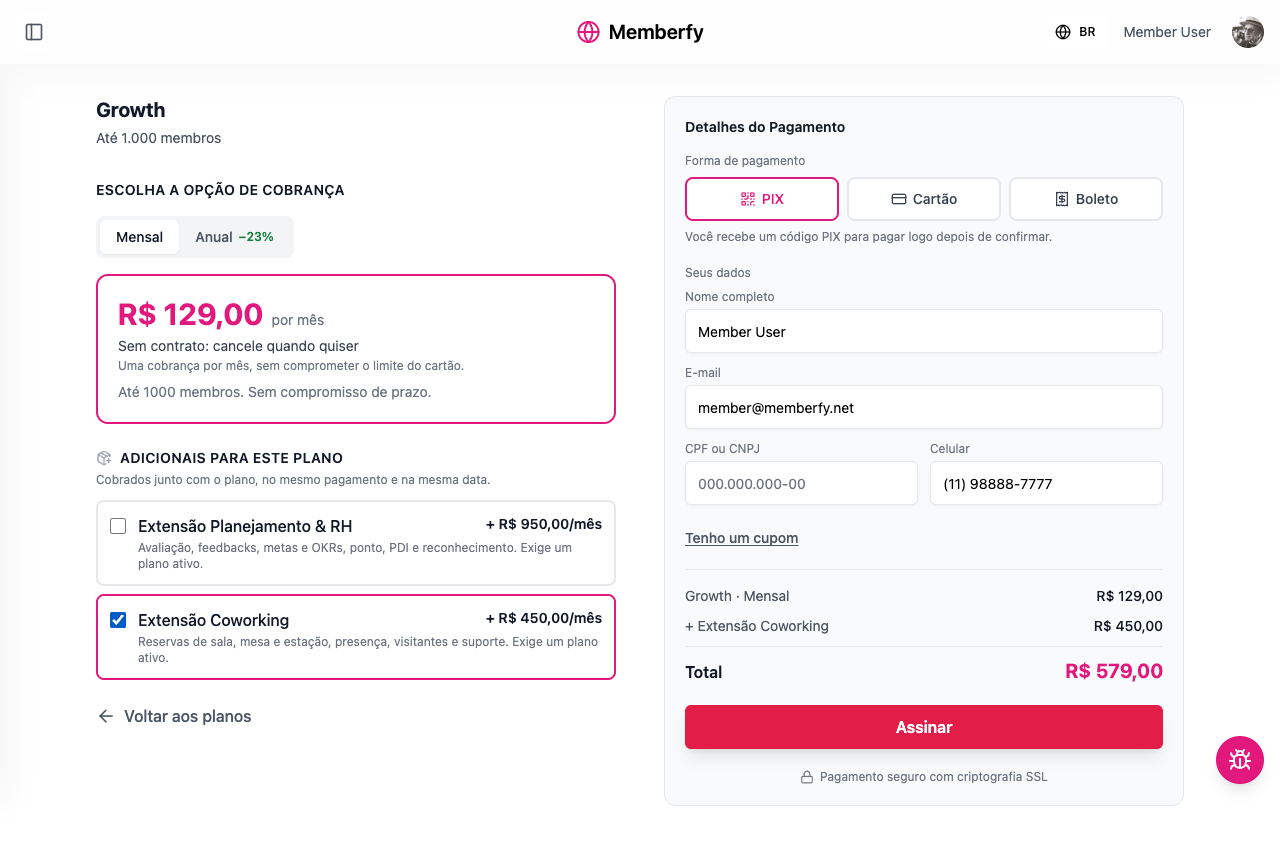
Growth Monthly + Coworking Extension, PIX. Summary: Growth · Monthly US$ 25.00, + Coworking Extension US$ 79.00, Total US$ 104.00. The community receives US$ 104.00 − US$ 8.27 in fees = US$ 95.73.
Student Monthly (US$ 15) with the fee paid by the buyer. The summary shows Platform fee US$ 2.05 and Total US$ 17.05. The community receives US$ 15.00.
Growth Yearly on the card, in 12 installments, with the interest paid by the buyer. The upfront price is R$ 1,188.00. The interest for 12× is 6.00%, R$ 71.28: Total R$ 1,259.28, in 12 installments of about R$ 104.94. By PIX, the same plan costs R$ 1,188.00.
Messages the buyer may see
| Message | What it means |
|---|---|
| Enter your CPF or CNPJ. The payment provider requires it. | The document is required |
| This CPF is not valid. Check the digits. | A typo in the document |
| Enter the area code and the number, e.g. (11) 99999-9999. | Incomplete mobile number |
| This card number is not valid. | Wrong card number |
| The payment was not accepted — "Nothing was charged…" | The bank declined it; try another card or another method |
| Payment under review | The payment processor is still checking it; the notice arrives when it is approved |
| This product has no payment method enabled. Contact the community. | The option has no payment method |
| This add-on requires an active plan… | They tried to buy an add-on without the plan |
| Sold out | The product's units ran out; let the community know |
| Join the community before buying | They need an account in the community |
| We could not complete the payment. Nothing was charged. | A temporary failure; try again |
| You already subscribe to this plan. | The person already has the plan; see Billing |
| You already have an open payment for this plan… | There is an unpaid PIX or boleto for the plan; pay that one |
| PIX expired | The 30 minutes are over; Generate a new PIX |
Common community mistakes
| Situation | What to do |
|---|---|
The plan doesn't show up at /pricing | Activate at least one of the plan's billing options |
| The total shows higher than the price | Who Pays the Fees? is set to Buyer |
| The buyer paid the PIX and didn't get in | Ask them to open the order page, which confirms the payment right away. If the PIX expired before it was paid (30 minutes), they generate another one |
| The boleto was paid and access wasn't unlocked | Clearing takes up to 3 business days |
Frequently asked questions
Does the buyer need an account first? Yes, an account in the community. If they don't have one, they create it along the way.
Can I send the link to a specific plan?
Yes: /pricing/<plan-address>.
Does the checkout accept debit cards? It accepts credit cards, PIX and boleto.
What if the person closes the screen before paying the PIX? The code stays on the order page and also arrives by email, and it is valid until it expires.
Do installments carry interest? Yes, from 2 installments on the card: 4.29% in total from 2× to 6×, 6.00% from 7× to 12×. By default, the buyer pays it. See Installment interest.
Does the checkout charge in dollars? In the plan's currency, normally the Brazilian real.
In the API
GET /api/checkout/subscription-groups (the catalog, with addOns; each option carries isHighlighted and each plan unlocks, the spaces it unlocks for the viewer), POST /api/checkout/calculate-price (the total, with coupon and add-ons) and POST /api/checkout (productId, paymentMethod, installments, couponCode, addOnProductIds, customerData, saveDocument, companyId). With companyId, the purchase belongs to the company: only its admin buys, the product must be among the company's offers and the CNPJ comes in customerData.document (or the one already saved on the company). With card installments, the responses include installmentInterestPayer, installmentInterestPercent, installmentInterest, totalWithInterest and installmentAmount, and calculate-price includes installmentOptions. The order page uses POST /api/checkout/purchases/{id}/refresh. See Checkout.
In the API: paymentMethod is no longer required for a free product (price 0), which returns paymentMethod: "FREE", pricePaid 0 and access granted; a coupon that brings the total to zero takes the same path and the response carries free: true (with companyId on a company purchase); on a plan, a 100% ONCE or REPEATING coupon answers 400 on couponCode; for a physical product, shippingAddress is required (400 with param on the missing field); sold-out courses and events answer 409 with data.soldOut.